Windows XP Windows 7 Windows 2003 Windows Vista Windows 綜合教學 Linux 系統教學
Windows 10 Windows 8 Windows 2008 Windows NT Windows Server 電腦軟體教學

Win10 安裝 KB3122947 更新失敗 0x80070643 手動部署修復

編輯:Windows 10 系統介紹

使用 DISM 手動安裝離線套件

KB3122947 累積更新安裝失敗並報錯 0x80070643 時,系統實際已下載套件至 C:\Windows\SoftwareDistribution\Download\,可用 DISM 手動部署。

操作步驟

  1. 右鍵「開始」→「命令提示字元 (系統管理員)」(或 Windows PowerShell 管理員)。
  2. 執行指令(64 位元範例,路徑需依實際資料夾名稱調整):
    dism /online /add-package /packagepath:C:\Windows\SoftwareDistribution\Download\c4a1b8896ce9fbfea96c1ee6890d52a5\windows10.0-kb3122947-x64.cab
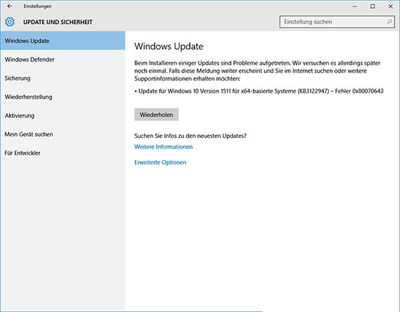
  3. 等待部署完成,重新開機。

KB3122947 更新錯誤

注意事項

  • 32 位元系統請在 Download 資料夾依日期找對應 .cab 檔。
  • 若 DISM 也失敗,可嘗試 sfc /scannow 修復系統檔案,或下載獨立安裝包 (MSU) 手動安裝。

Copyright © Windows教程網 All Rights Reserved