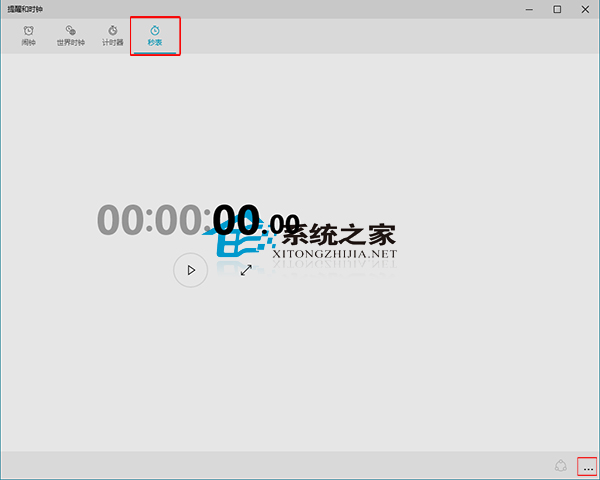
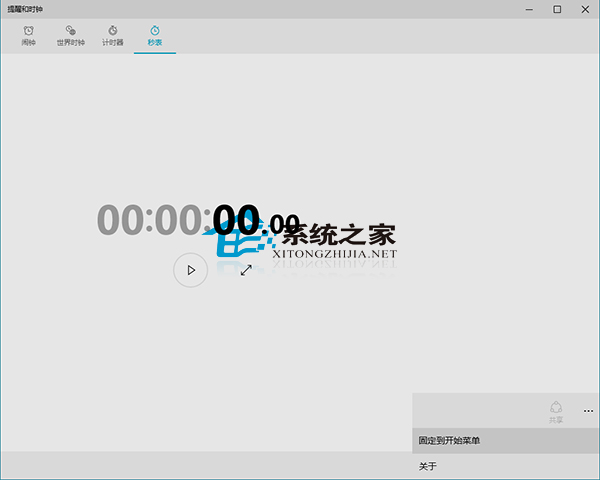
Windows 10 內建「鬧鐘與時鐘」應用包含碼錶功能,常用者可釘選到開始選單快速啟動:
釘選後,開始選單會出現碼錶動態磚貼,點擊即可直接進入計時介面,適合運動訓練、番茄工作法等計時場景。
如何在 Win10 預覽版找回 Win8.1 風格網路清單(開始選單模式)
Win10 裝置管理員解除安裝記憶體驅動程式教學
Windows 10 防止關機時自動更新:官方工具 wushowhide.diagcab 隱藏特定更新
Win10 桌布變模糊?關閉 JPEG 壓縮品質限制恢復原圖清晰度
Win10 網路不穩定、頻斷線怎麼辦?關閉網卡省電模式完整教學
Win 10 禁用驅動程式強制簽名(含圖文詳細版)
Win10 開機黑屏時間長完整解決方案:更新獨顯驅動 + 關閉快速啟動 (含安全模式進入法)
Win10 待機斷網怎麼解決?裝置管理員關閉網卡省電功能保持網路連線