Windows XP Windows 7 Windows 2003 Windows Vista Windows 綜合教學 Linux 系統教學
Windows 10 Windows 8 Windows 2008 Windows NT Windows Server 電腦軟體教學

Win10 檔案總管地址列快速啟動系統工具:cmd、regedit、gpedit.msc 等指令直達

編輯:Windows 10 系統介紹

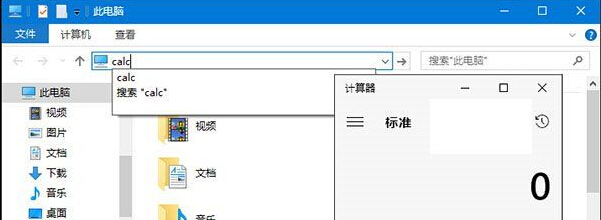
檔案總管地址列不只能輸入路徑,還能直接執行系統指令,比 Win+R 更直觀。Win7/8/10/11 通用。
常用指令

  • cmd - 命令提示字元
  • regedit - 登錄編輯器
  • msconfig - 系統設定
  • gpedit.msc - 群組原則編輯器 (專業版以上)
  • devmgmt.msc - 裝置管理員
  • mspaint - 畫圖
  • calc - 計算機
  • 網址 (如 https://google.com) - 呼叫預設瀏覽器開啟

在地址列輸入指令按 Enter 即可執行,無需記住快捷鍵,發現隱藏功能的小技巧。

Copyright © Windows教程網 All Rights Reserved