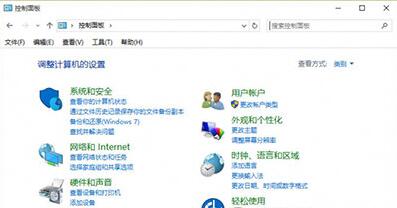
點擊控制台無反應、閃退、或僅顯示空白視窗,通常是 System32 下的 .cpl 控制台擴充檔損壞、或檔案關聯錯誤導致。提供分級修復方案。
%SystemRoot%\System32 開啟系統目錄。*.cpl 列出所有控制台項目檔案。sysdm.cpl、appwiz.cpl、desk.cpl 等) → 執行系統檔案修復。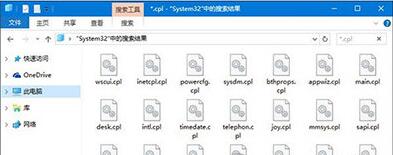
sfc /scannow 等待掃描修復完成(可能需數分鐘)。DISM /Online /Cleanup-Image /CheckHealthDISM /Online /Cleanup-Image /ScanHealthDISM /Online /Cleanup-Image /RestoreHealth若 sfc 正常但控制台仍異常,多為檔案關聯註冊表損壞。新建文字檔貼入以下內容,存為 cpl_fix.reg,雙擊匯入:
Windows Registry Editor Version 5.00

[HKEY_CLASSES_ROOT\.cpl]
@="cplfile"
"Content Type"="application/cpl"

[HKEY_CLASSES_ROOT\.cpl\PersistentHandler]
@="{098f2470-bae0-11cd-b579-08002b30bfeb}"

[HKEY_CLASSES_ROOT\cplfile]
@="Control Panel extension"

[HKEY_CLASSES_ROOT\cplfile\shell]

[HKEY_CLASSES_ROOT\cplfile\shell\cplopen]
@="Open with Control Panel"

[HKEY_CLASSES_ROOT\cplfile\shell\cplopen\command]
@="rundll32.exe shell32.dll,Control_RunDLL %1,%*"

[HKEY_CLASSES_ROOT\cplfile\shell\runas]

[HKEY_CLASSES_ROOT\cplfile\shell\runas\command]
@="rundll32.exe shell32.dll,Control_RunDLLAsUser %1,%*"
匯入成功提示後,重新開機或重啟 explorer.exe 生效。
control 直接開啟控制台。GodMode.{ED7BA470-8E54-465E-825C-99712043E01C})包含所有控制台項目。從檔案層面診斷 .cpl 損壞,到系統修復、關聯重建,層層遞進解決控制台「打不開」頑疾。
Win10 修改本地帳號使用者名稱:控制台使用者帳戶變更名稱、或電腦管理本地用戶重新命名
Win7 右鍵桌面彈出 igfxsrvc.exe 視窗且變慢?刪除登錄 ContextMenuHandlers 修復
Win10 查詢與啟用 SSD TRIM 指令:fsutil behavior query/set disabledeletenotify
Win10 檔案總管左側多出「程式庫」資料夾?一鍵隱藏導航窗格顯示選項
Win10 安裝與啟用中文語言包:lpksetup 命令匯入 .cab 語言包 + 批次檔激活
Windows 10 顯示/隱藏檔案副檔名:檔案總管一鍵切換
Win 10 週年更新版無法關閉 Cortana?登錄檔新增 AllowCortana=0 關閉
Win10 Windows Update 手動檢查更新:設定→更新與安全性→Windows Update 一鍵下載安裝補丁