Win7 右鍵桌面後系統變慢並彈出 igfxsrvc.exe 命令提示字元視窗,主因為顯示卡右鍵選單擴充功能異常或病毒。刪除登錄 igfxcui 鍵值並停用開機自啟程式即可解決。
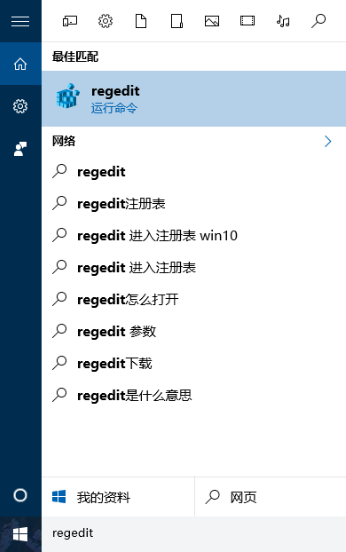
regedit 開啟登錄編輯器。HKEY_CLASSES_ROOT\Directory\Background\shellex\ContextMenuHandlers,刪除 igfxcui 鍵。msconfig,在「啟動」頁籤點擊「全部停用」,重新開機。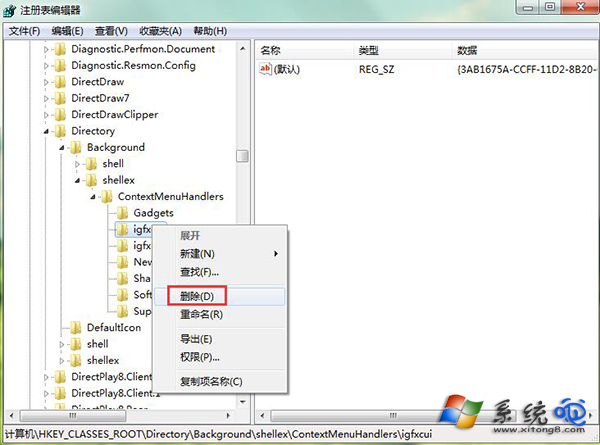
執行 regedit
刪除 igfxcui 鍵值
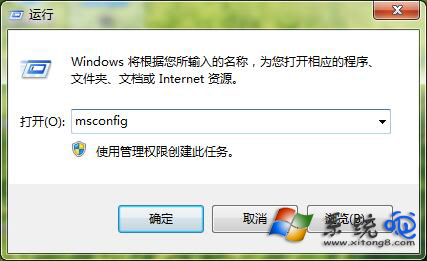
msconfig 系統設定
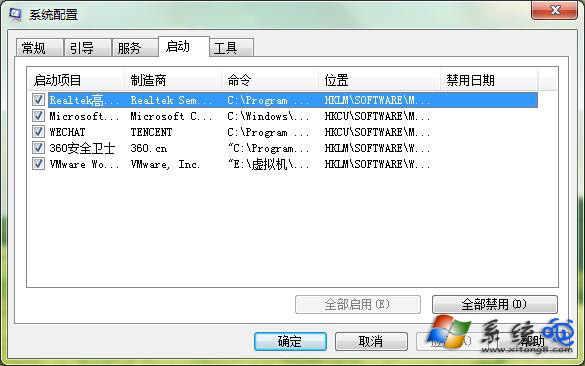
停用所有啟動項目
此問題多為 Intel 顯示卡驅動右鍵選單模組異常,刪除登錄鍵值後右鍵選單恢復流暢,彈出視窗消失。
Win10 硬碟使用率持續 100% 導致卡頓?停用 HomeGroup Listener 服務與改掉狂按 F5 習慣
Win10 系統最低硬體需求:1GHz CPU、1/2GB 記憶體、16/20GB 硬碟、DirectX 9 顯卡
Win10 Build 10049 斯巴達瀏覽器細節圖賞:整合 Cortana、收藏列表、F12 開發工具;下載管理/離線閱讀/同步暫未開放
Win10 一鍵切換電源計劃註冊表完整碼:桌面右鍵選單新增平衡/高效能/省電秒切選單
Win10 關閉「快速存取」功能恢復傳統「這台電腦」預設開啟
Win10 托盤電池圖示消失解決方法:裝置管理員重置電池驅動 (同 22183/22227/22228 核心方案)