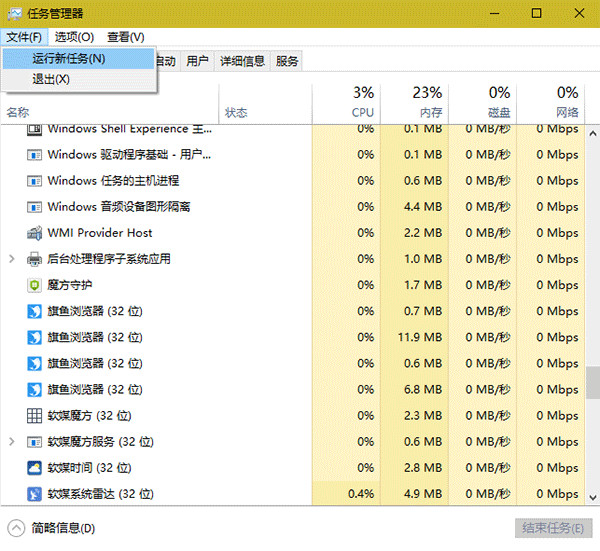
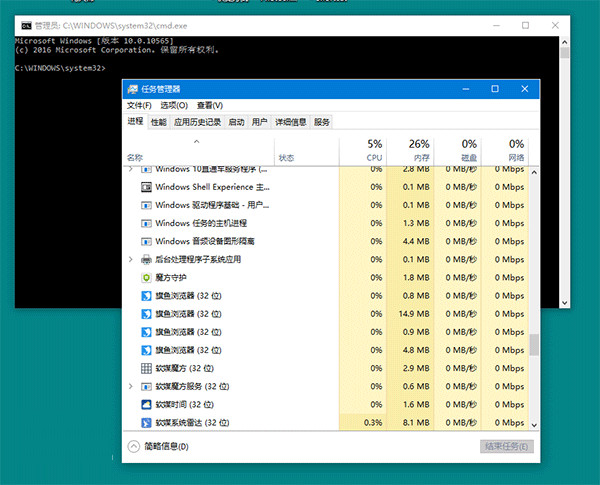
無需輸入指令、無需右鍵選單,極速啟動提權 CMD,適合頻繁需管理員權限的操作。
Win10 磁碟清理按鈕消失?重新啟用回收站即可恢復
Win10 將支援 Ubuntu 子系統運行?Build 2016 微軟與 Canonical 合作深度解析
Win10 磁碟檢查結果怎麼看?事件檢視器篩選事件 ID 26226 查看詳細日誌
Windows 10 照片檢視器圖片背景發黃怎麼辦?螢幕解析度設定裡校正色彩設定檔
Win10 啟用 Aero Glass 透明磨砂效果:第三方工具教學
Win10 魯大師無法執行?關閉再開啟相容模式兩步搞定
Win10 顯示卡驅動更新兩大法:裝置管理員自動更新、360 驅動大師離線安裝
Win10 免費升級提示收不到?檢查 KB3035583 補丁與 GWX 程式完整排查指南