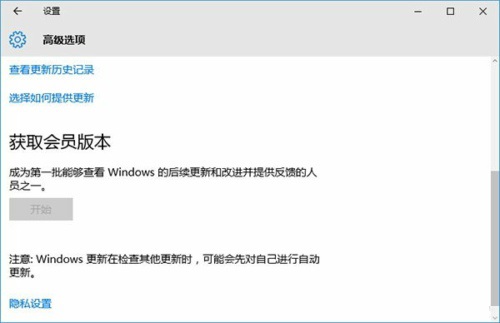
「會員版」即 Insider Preview,可搶先體驗新功能,加入 Windows 會員計畫即可自動推送。
若選項無法使用,檢查網路與帳號狀態;正式版用戶可隨時切換回生產通道。
Windows 10 預覽版升級通道切換教學(同 ID 21067)
Win10 螢幕顯示「輸入不支援」 (解析度/重新率設定過高) 解決方法
Win10 虛擬桌面完整使用教學:建立、切換、移動視窗、快速鍵
Win10 切換快速更新通道獲取最新預覽版教學
Win10 內建應用誤刪如何恢復?從應用商店重新安裝
Win10 禁止添加 Microsoft 帳號登入:群組原則「帳戶:阻止 Microsoft 帳戶」設為「使用者無法新增」
Win10 開啟登錄編輯器:Win+R 執行 regedit 兩步驟直達
Windows 10 平板模式工作列自動隱藏:官方未支援,第三方工具 Nibbler Apps 實現