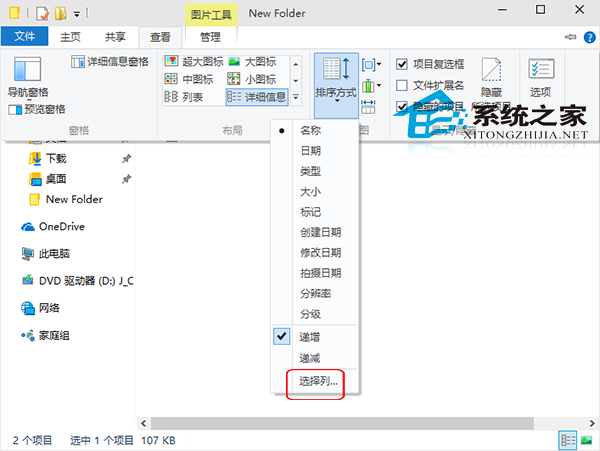
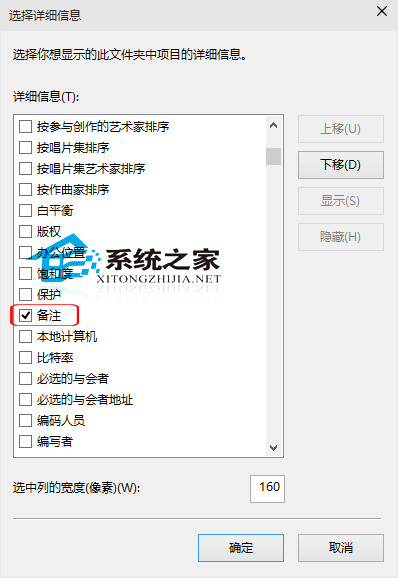
為檔案加上「備註」有助歸類管理,但預設詳細資料檢視不顯示此欄。只需兩步啟用:
同樣可嘗試啟用「標記」欄位,體驗亦不錯。
Win10 為電腦新增描述:區域網路快速識別裝置用途
Win10 桌面圖示位置排列無法記憶?註冊表修復 InProcServer32
Win10 磁碟分區完整指南:規劃、安裝中與安裝後分區
Windows 10 惡意軟體移除工具 (MRT) 使用教學:自定義掃描 C 槽快速查殺
Win10 查看磁碟狀態 (主分區/邏輯分區/啟動分區):電腦管理→磁碟管理一覽無遺
Win10 OneNote 關閉自動同步筆記本:節省頻寬、掌控同步時機
Win10 一週年更新最低規格:記憶體 2GB、硬碟 16GB/20GB (64-bit),舊電腦慎升
Win10 如何將 Microsoft 帳戶綁定至本機電腦?啟用應用商店、OneDrive、便箋完整教學