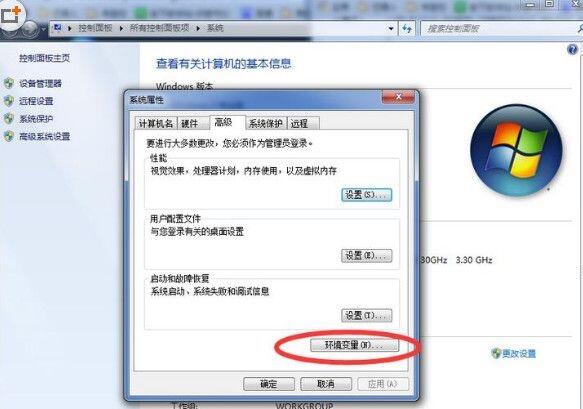
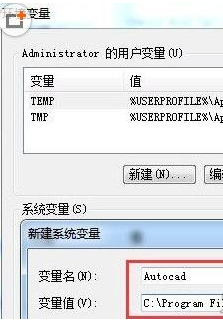
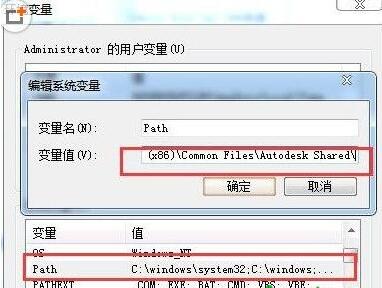
在 Windows 10 環境下執行 AutoCAD 時,若出現「遺失 ac1st16.dll」錯誤,可嘗試以下兩種解決方案:
ac1st16.dll
AutoCAD
C:\Program Files (x86)\Common Files
Path
;C:\Program Files (x86)\Common Files\Autodesk Shared
兩種方法均可解決 DLL 遺失問題,建議優先嘗試方法一,若無效再進行方法二的環境變數設定。
Win10 驅動程式下載安裝技巧:使用驅動人生一鍵更新
Win10 設定 360 殺毒定時掃毒:排程每日/每週/每月自動查殺
Win10 連不上 Wi-Fi?檢查網卡驅動、無線服務、適配器設定三步排查
Win10 10074 「個人化」打不開提示無關聯程式:重複文章同 24580
Windows 10 螢幕截圖快捷鍵完整教學:PrtSc、Alt+PrtSc、QQ 截圖
Win10 安裝 Office 365/2016 電腦無回應?官方解決方案:重新啟動安裝程序
Win10 關機出現 explorer.exe 應用程式錯誤?解決方案在這裡
Win10 將常用資料夾釘選到開始選單:個人化設定一鍵加入