錯誤現象
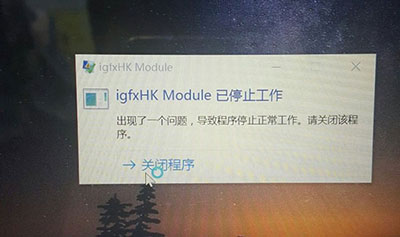
開機或使用中彈出「igfxhk module 已停止運作」錯誤視窗,畫面可能閃爍、解析度異常。
原因分析
igfxhk module 為 Intel 核心顯示晶片驅動程式元件,負責熱鍵與顯示管理。錯誤主因:顯卡驅動程式安裝不完整、版本不相容、或系統更新導致驅動檔案損毀。
解決方案一:重新安裝 Intel 顯卡驅動程式(推薦)
- 「裝置管理員」→ 「顯示介面卡」→ 右鍵 Intel 裝置 → 「解除安裝裝置」。
- 勾選「嘗試移除此裝置的驅動程式軟體」→ 「解除安裝」。
- 重新開機,Windows 自動安裝通用驅動,或前往 Intel 官網 下載最新版驅動手動安裝。
解決方案二:刪除 igfxHK.exe 檔案(進階)
- 檔案總管前往:
C:\Windows\System32\
- 搜尋
igfxHK.exe,以系統管理員權限刪除(建議先備份)。
- 重新開機驗證。
補充說明
- 雙顯卡筆電(核顯+獨顯)建議同時更新兩者驅動程式。
- 此錯誤通常不影響核心功能,僅干擾使用者體驗。
- 若問題持續,檢查 Windows Update 選擇性更新中的驅動程式,或聯繫筆電廠商技術支援。
總結
重新安裝 Intel 顯卡驅動程式為首選方案,刪除 igfxHK.exe 為備選。多數情況下首選方案即可徹底解決。