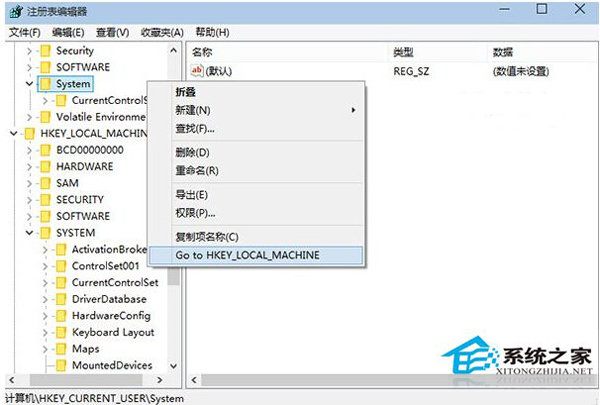
Win10 登錄編輯器新增右鍵「跳轉」功能 (依測試用戶建議加入):
HKEY_LOCAL_MACHINE\SYSTEM
HKCU\SYSTEM
HKLM\SYSTEM
大幅提升頻繁編輯登錄檔用戶的操作效率。
Win10 螢幕亮度無法調整?註冊表修改 KMD_EnableBrightnessInterface2、卸載雙顯卡驅動、Windows Update 修復三大方案
Win10 常用快速鍵大全:視窗靠邊、虛擬桌面、工作檢視、切換視窗一覽表
Windows 10 變更使用者頭像為自訂圖片
Win10 Edge 瀏覽器預設安裝路徑位置
Windows 10 筆電藍牙傳檔:fsquirt 快速開啟藍牙傳輸精靈互傳手機檔案
Win10 設定待機不斷網:讓下載/掛機持續運作
Win10 建立本機帳號繞過微軟帳號強制登入:兩大實用技巧
Windows 10 應用商店下載檔案預設路徑與清理方法