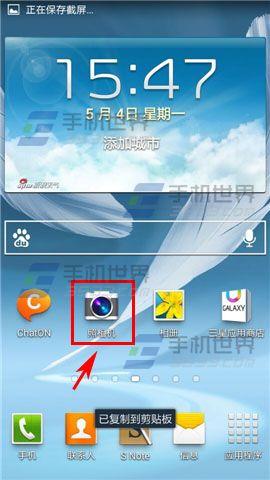
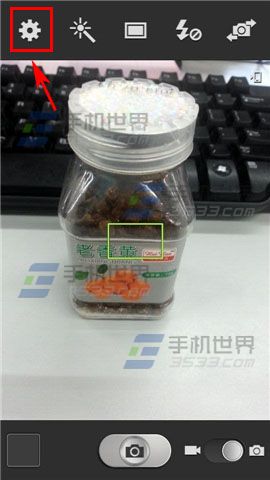
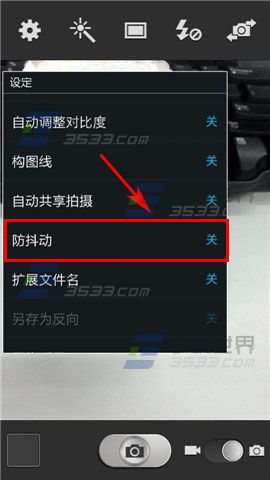
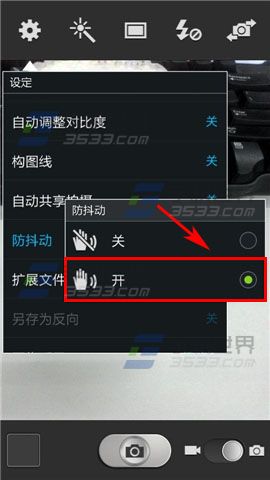
三星 Note2 開啟相機防手震步驟:
即可啟用光學防手震,拍照更穩定。
Win10 Build 14379 更新內容(同 21227 完整版)
Win10 筆電通知區電源圖示消失找回教學:裝置管理員重置電池驅動 (同 22183/22227/22229 核心方案)
Win10 提示「目前網頁的指令碼發生錯誤」?病毒/流氓軟體植入惡意 JS 腳本
Win10 移除桌面右鍵「圖形屬性/選項」:登錄刪除 igfxDTCM
Win10 TP 禁用開始功能表恢復開始畫面(傳統 Metro 介面)
Win10 開機提示「裝置處於離線狀態」?改用本地帳號登入即解
Win10 「音樂」App 加入本地音樂資料夾,打造個人音樂庫
Win10 啟用「隱藏使用者安裝」:群組原則限制他人使用已安裝軟體