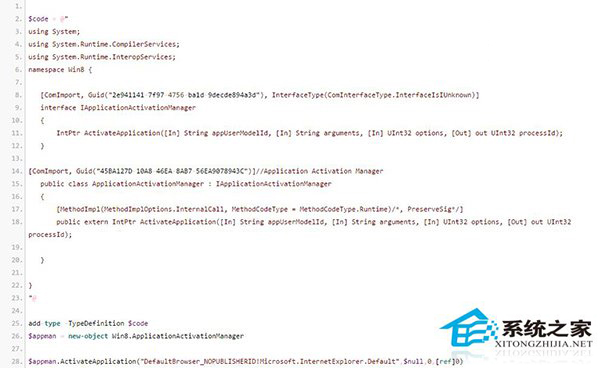
Win10 保留 IE11 但移除觸控版 (Metro IE),觸控螢幕用戶可用 PowerShell 腳本恢復:
@adamUCF
.ps1
IE11 本身支援觸控,僅在 Win10 被封鎖,腳本解除封鎖即可使用 Metro 版 IE11。
Win10 郵件應用如何更換背景壁紙?個人化設定教學
Win10 內建麥克風開啟與關閉設定教學
Win10 取消「更新並關機」強制更新:隱藏更新 + 停用服務雙重封鎖
Windows 10 內建防毒 Windows Defender 無法啟動的修復方法
Win10 如何調整視窗標題列高度與捲軸寬度?登錄檔 WindowMetrics 修改 CaptionHeight 與 ScrollWidth 數值
Windows 10 如何錄螢幕?Game Bar 原生工具免安裝、Win+G 一鍵呼出
Win10 觸控板三指單擊啟動 Cortana 小娜設定教學:UltraNav 驅動介面自訂手勢綁定
Windows 10 Cortana (小娜) 無法連網解決方案:重置 Winsock 與變更 DNS