同樣透過登錄表修改 Edge 瀏覽器啟動時的背景顏色,本文提供另一組登錄表路徑供參考(部分系統版本路徑略有不同)。
regedit)。HKEY_CURRENT_USER\SOFTWARE\Classes\Local Settings\Software\Microsoft\Windows\CurrentVersion\AppModel\SystemAppData\Microsoft.MicrosoftEdge_8wekyb3d8bbwe\SplashScreen\Microsoft.MicrosoftEdge_8wekyb3d8bbwe!MicrosoftEdge#C00000 紅、#00B050 綠、#FFFF00 黃等)。
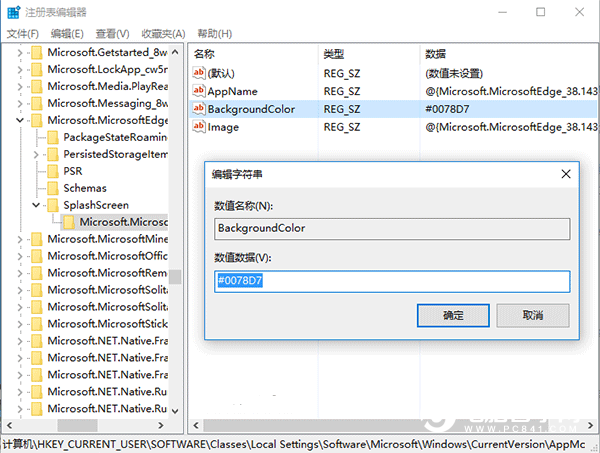
| 顏色 | 色碼 |
|---|---|
| 預設藍 | #0078D7 |
| 深紅 | #C00000 |
| 綠色 | #00B050 |
| 純黃 | #FFFF00 |
| 橙色 | #E36C09 |
| 紫色 | #7030A0 |
更多色碼請搜尋「RGB 色碼表」自行查詢。