Windows 10 預覽版升級正式版方法:先升級至 Build 10240 正式版,然後設定 → 更新與安全性 → Windows Update → 進階選項 → 「停用會員版本」退出 Insider 計畫。確認後即為正式版用戶,但若非從 Win7/8.1 升級而來,需為當前版本付費授權。版本早於 10240 建議先升級再退出,否則無法收到正式版推送。
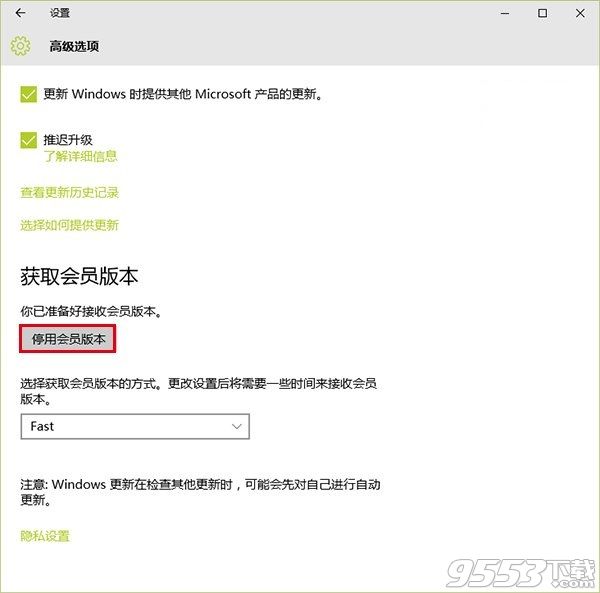
步驟簡單,核心在於先達到 10240 基準版本再退出計畫。
Win10 磁碟使用率 100% 導致卡頓?十大優化方案:關閉家庭群組、碎片整理、Defender、Search、Superfetch、Windows.old、虛擬記憶體、IPv6、視覺特效
什麼是 Windows 10 Continuum 連續體?手機秒變 PC 完整解析
Win10 TH2 升級中斷/斷電後無法繼續?清理快取重新更新
Win 10 RS2 Build 14931 快速預覽版更新內容與已知問題完整彙總
Win10 9879 平板電腦啟用 Surface 風格開始畫面
Win10 週年更新預覽版 14393.67 更新內容:Mobile 藍牙耗電與韓文登入修復
Win10 預覽版 ISO 鏡像整合語言包製作教學:DISM 指令掛載 WIM、加入語言包、設定預設語言、重新封裝 ISO