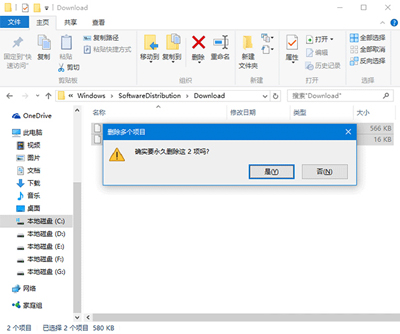
升級過程斷電/強制關機導致更新元件損毀,需清除已下載的暫存檔並重置更新服務。
C:\Windows\SoftwareDistribution\Download
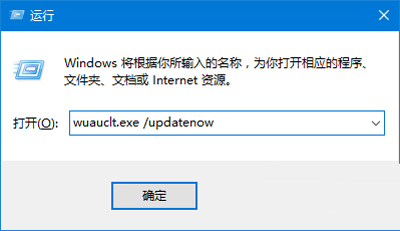
wuauclt.exe /updatenow
exe
/
SoftwareDistribution\Download 為更新暫存資料夾,殘留損毀檔案會導致續傳失敗。wuauclt.exe /updatenow 強制觸發更新檢測與下載。
SoftwareDistribution\Download
Win 10 解析度無法調整?Windows Update 安裝顯卡驅動一鍵修復 (完整版)
Win10 Build 10147 搶先體驗:可選版本(家庭/專業)、需輸入金鑰、安裝後可付費升級版本
Windows 10 工作列時鐘圖示消失怎麼辦?任務列屬性啟用系統圖示
Windows 10 郵件與行事曆同步錯誤 0x80c8043e:同 ID 23335 方案重複
Win 10 如何建立測試帳戶參加考試?新增本機帳戶並指派微軟官方試卷
Windows 10 修改產品金鑰 (Product Key) 完整指令教學
360 安全衛士一鍵升級 Win10 合作方案詳解
Windows 10 Mobile 直裝 Android APK 實測教程(需開發者模式、支援機型限定)