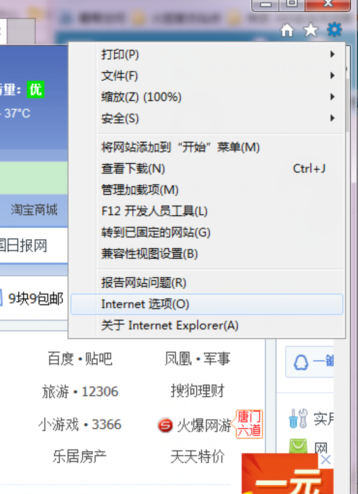
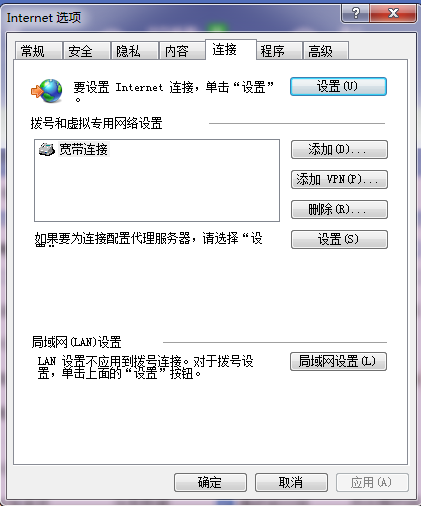
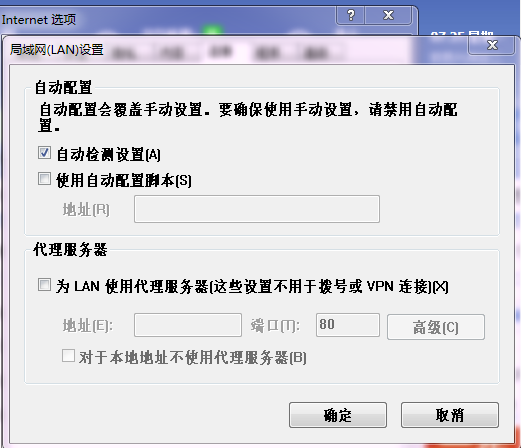
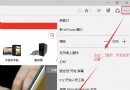
本文解決方案與 ID 21039 相同:開啟 Internet Explorer → 網際網路選項 → 連線 → 區域網路設定 → 取消勾選「為 LAN 使用 Proxy 伺服器」,調整「自動偵測設定」勾選狀態。請參考 ID 21039 完整步驟。
Win10 更新驅動程式逾時問題解決方案
Win10 移除桌面右下角版本水印:去水印工具 Remove all watermark 一鍵操作 (附副作用:系統屬性版本名稱消失)
Win10 玩遊戲無法全螢幕/有黑邊?修改登錄檔 Scaling 值與啟用 DirectPlay 組件修復
Win10 關閉 UAC 使用者帳戶控制的方法
Win10 UAC 對話框「是」按鈕無法點擊?將帳號加入 Administrators 群組解決
Win10 右鍵選單樣式修改:同 22059/22011 登錄 ImmersiveContextMenu 切換傳統/現代樣式
Win10 忘記登入密碼?利用 Sticky Keys 替換法在系統層級重置密碼(無需 PE、無需舊密碼)
Win10 應用程式更新錯誤 0x803F7000 完整解決方案