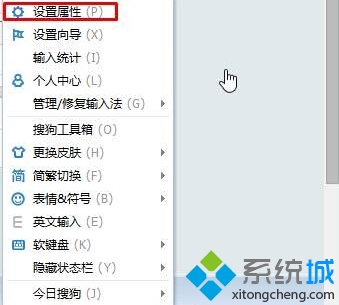
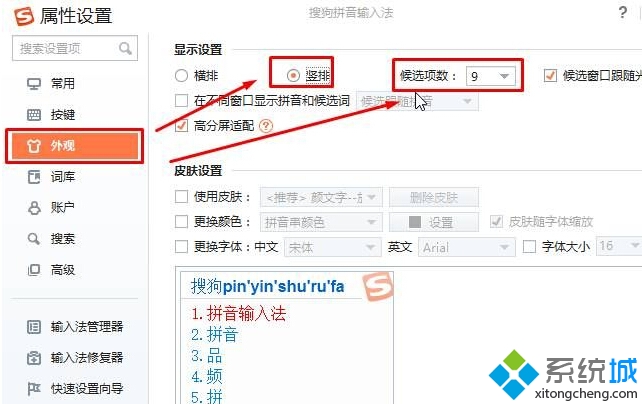
Windows 10 下搜狗輸入法候選詞預設橫向,可改為直向顯示:右鍵搜狗工具列 → 「設定屬性」 → 「外觀」頁籤 → 勾選「直排」 → 設定候選項數 → 套用確定。
設定後候選詞將垂直排列,適合直向閱讀習慣。
Win10 提示 mfc100u.dll 遺失怎麼辦?補檔+註冊兩步搞定
Windows 10 任務列圖標透明化設定教學:登錄修改法(含復原步驟)
Windows 10 一行指令讓休眠檔案瘦身 60%:powercfg hibernate size 完整教學
Win10 如何更換預設鎖定畫面壁紙?登錄指定圖片路徑永久生效
Win10 設定開機密碼/PIN/圖片密碼完整教學
Win10 升級 TH2 失敗錯誤 0xc1900101-0x30018?啟動核心更新服務解決安裝受阻
Win10 更新後不斷彈出事件檢視器?關閉 Windows Event Log 服務解決
Windows 10 雙顯卡切換失效解決方案:驅動更新與手動指定獨顯