Windows 10 開始畫面「照片」動態磚會輪播圖片,若不想顯示,右鍵點擊「照片」應用圖示 → 「更多」 → 「關閉動態磚」即可停用。
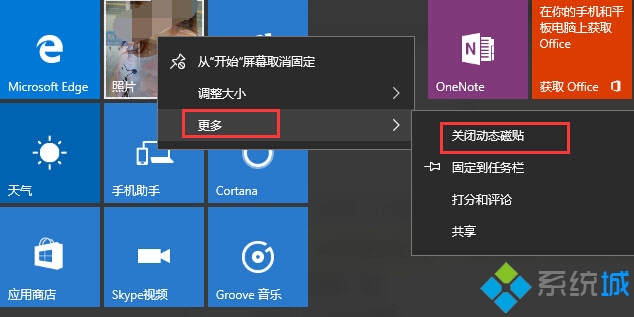
同樣方法適用於其他動態磚應用(郵件、行事曆、新聞等)。
Windows 10 Mobile 10536 安裝錯誤 0x800705b4 解決辦法:重啟清背景、必要時還原 WP8.1 重升
Win10 桌面/資料夾右鍵選單無反應?同 22068 登錄新增 IsShortcut 修復
Win10 藍屏記錄詳細資訊:註冊表啟用 DisplayParameters 讓藍屏顯示傳統診斷參數
Win10 找不到 QQ 電腦管家圖示?兩招快速找回桌面捷徑
Win10 系統損壞無法登錄?啟動盤離線修復註冊表不重裝救系統
Win10 啟用內建 Administrator 超級管理員帳戶:電腦管理圖形介面操作