Windows XP Windows 7 Windows 2003 Windows Vista Windows 綜合教學 Linux 系統教學
Windows 10 Windows 8 Windows 2008 Windows NT Windows Server 電腦軟體教學

Windows 10 Mobile 10536 安裝錯誤 0x800705b4 解決辦法:重啟清背景、必要時還原 WP8.1 重升

編輯:Windows 10 系統介紹

錯誤背景

Windows 10 Mobile Insider Preview 從 10512 升級 10536 時遭遇 0x800705b4 更新錯誤。
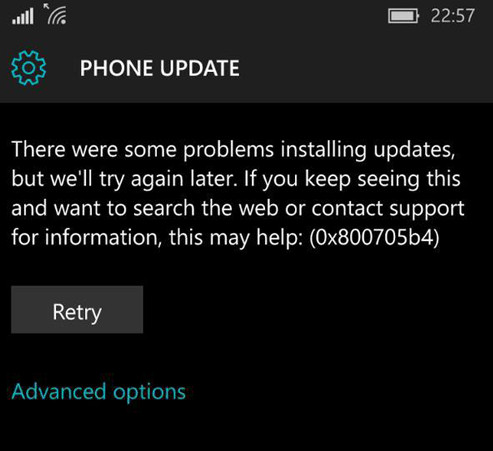
Mobile 更新錯誤

Windows 10 Mobile 10536 更新錯誤 0x800705b4
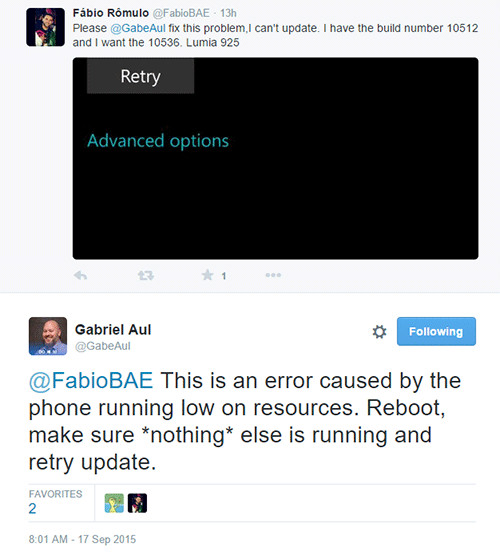
官方解決方案 (Gabriel Aul)

  1. **重新開機手機**
  2. **確保無背景應用程式執行** (全部關閉)
  3. **重新嘗試更新**

官方建議重啟清背景

Insider 負責人建議:重啟、清背景、重試

進階方案:若重試 4 次仍失敗 (卡 6% 崩潰)

**還原至 Windows Phone 8.1 → 不勾選還原備份 → 重新升級至 Windows 10 Mobile**。

原因:備份還原會啟動背景任務佔用資源,導致更新程序逾時 (0x800705b4 = ERROR_TIMEOUT)。
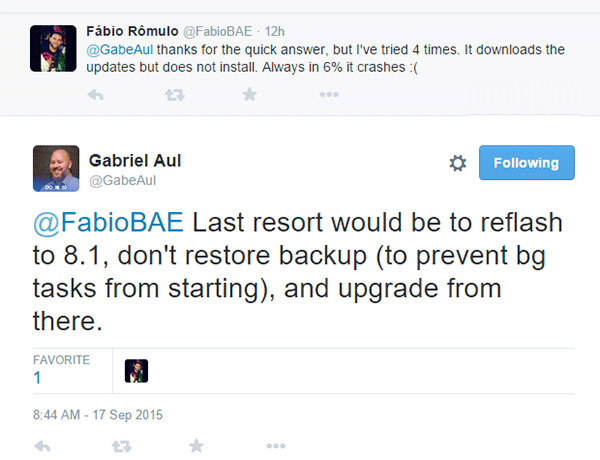
建議還原 WP8.1 不還原備份

建議:還原 WP8.1 (不還原備份) → 重新升級

預防與最佳實務

  • 更新前:手動關閉所有 App、重新開機、確保 >4GB 可用空間、接電源、連 Wi-Fi
  • 錯誤代碼本質:行動裝置資源受限下背景程序導致更新逾時
  • 此錯誤在早期 Mobile Insider 建構版較常見,正式版較少發生
Copyright © Windows教程網 All Rights Reserved