Windows XP Windows 7 Windows 2003 Windows Vista Windows 綜合教學 Linux 系統教學
Windows 10 Windows 8 Windows 2008 Windows NT Windows Server 電腦軟體教學

Windows 10 周年更新無法直接關閉 Cortana?用群組原則或登錄表強制停用

編輯:Windows 10 系統介紹

Windows 10 周年更新移除了設定介面中直接關閉 Cortana 的開關,但仍可透過群組原則(專業版/企業版)或登錄表(家用版)強制停用。

專業版/企業版:群組原則法

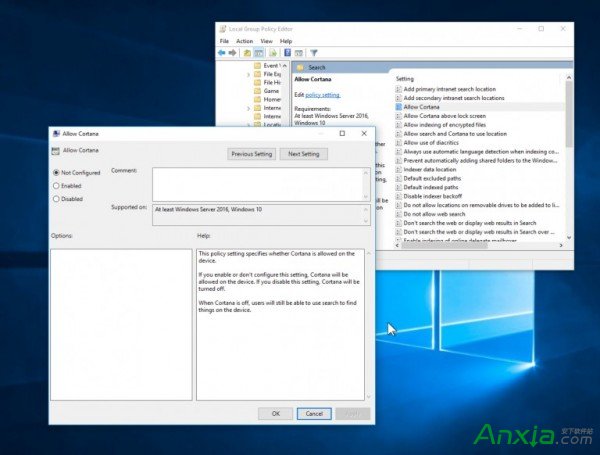
  1. Win + R 輸入 gpedit.msc 開啟群組原則編輯器。
  2. 依序展開:電腦設定 → 系統管理範本 → Windows 元件 → 搜尋。
  3. 雙擊「允許 Cortana」,選擇「停用」,點擊「套用」與「確定」。

Cortana 設定介面

群組原則停用 Cortana

家用版:登錄表法

  1. Win + R 輸入 regedit 開啟登錄表編輯器。
  2. 瀏覽至:HKEY_LOCAL_MACHINE\SOFTWARE\Policies\Microsoft\Windows\Windows Search(若無此鍵值請手動建立)。
  3. 右鍵空白處 → 新增 → DWORD (32-bit) 值,命名 AllowCortana。
  4. 雙擊該值,數值資料設為 0,確定並重啟電腦。

完成後 Cortana 將徹底停用,搜尋列恢復為傳統搜尋功能。

Copyright © Windows教程網 All Rights Reserved