Windows XP Windows 7 Windows 2003 Windows Vista Windows 綜合教學 Linux 系統教學
Windows 10 Windows 8 Windows 2008 Windows NT Windows Server 電腦軟體教學

Windows 10 取消 Proxy 代理伺服器設定:透過網際網路選項快速完成

編輯:Windows 10 系統介紹

若 Windows 10 因代理伺服器設定導致無法上網,可透過「網際網路選項」中的「區域網路設定」快速取消代理,恢復直連網路。

操作步驟

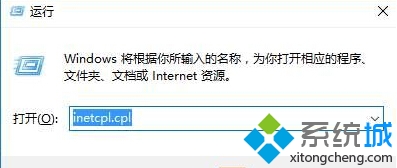
  1. 按 Win + R 開啟「執行」,輸入 inetcpl.cpl 按 Enter 開啟「網際網路屬性」。
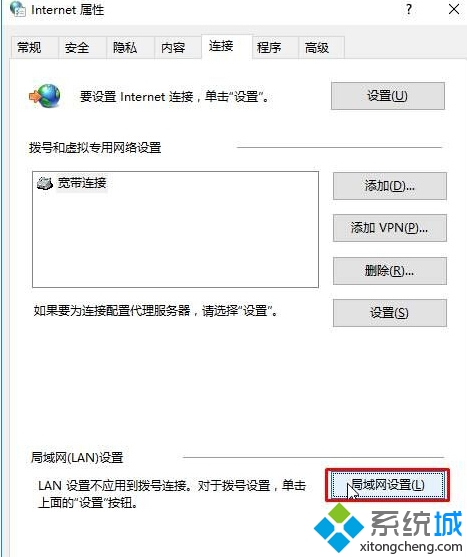
  2. 切換至「連線」標籤,點擊「區域網路 (LAN) 設定」。
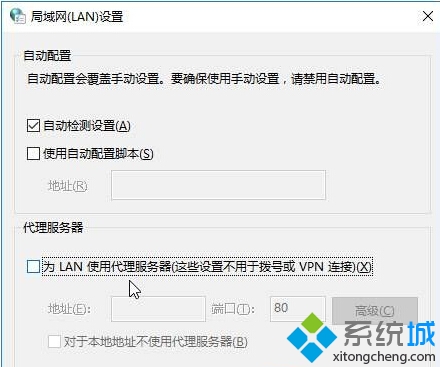
  3. 取消勾選「為 LAN 使用 Proxy 伺服器...」。
    • 若「自動偵測設定」已勾選 → 取消勾選。
    • 若未勾選 → 勾選它。
  4. 點擊「確定」關閉所有視窗。

開啟網際網路屬性

區域網路設定

取消 Proxy 設定

完成上述步驟後,代理伺服器即被停用,電腦將直接連線網路。

Copyright © Windows教程網 All Rights Reserved