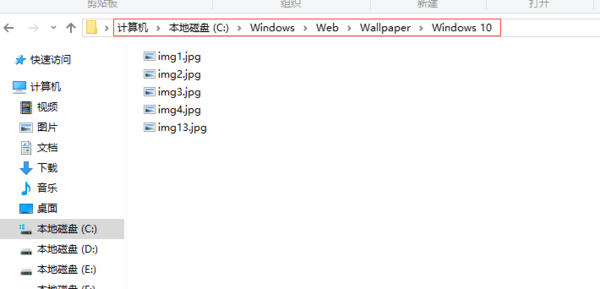
此資料夾為系統預設鎖定畫面圖片來源,刪除後該圖片不再於鎖定畫面輪播。若要自訂鎖定畫面,請至「設定」→「個人化」→「鎖定畫面」設定。
Windows 10 如何將磁貼固定到桌面?拖曳即可但會失去動態效果
Win10 無法解除安裝 360 安全桌面?關鍵步驟「我要直接解除安裝」
Win10 Mobile 手機如何查看系統版本號?深層選單操作圖文教學
Win10 桌面圖示太大怎麼調?右鍵檢視調整大小或修改解析度兩種方法
Windows 10 筆電開啟 Wi-Fi 熱點:原生行動熱點 vs 第三方工具
Win10 PIN 碼無法使用?啟用 IPsec Policy Agent 服務即可恢復
Win10 如何記錄藍畫面日誌?設定核心記憶體傾印輸出 MEMORY.DMP 分析錯誤原因
Windows 10 Build 10130 新變化:Cortana 介面大改版、通知動畫變白、電池視窗支援主題色