透過 hosts 檔案封鎖網站:
C:\WINDOWS\system32\drivers\etc 開啟資料夾。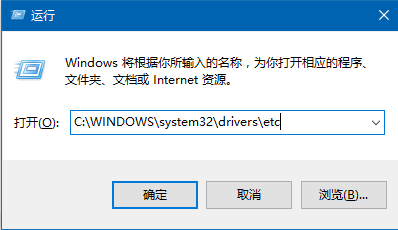
hosts → 「開啟方式」→「記事本」。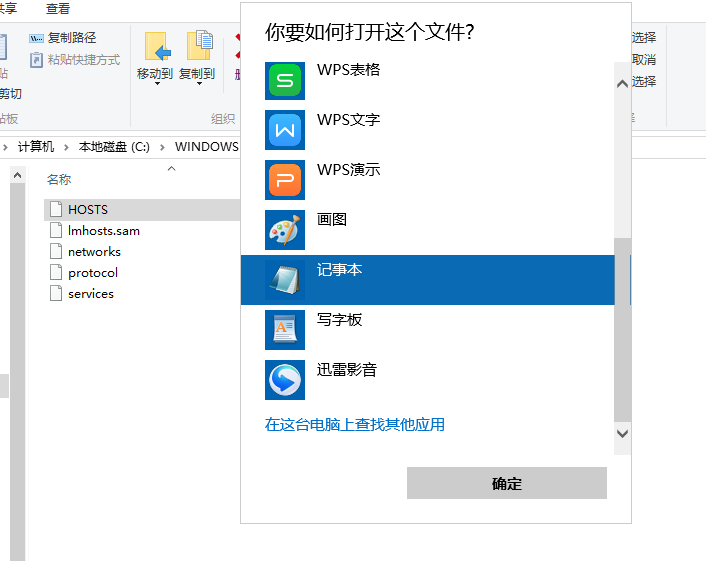
127.0.0.1 要封鎖的網域 或 0.0.0.0 要封鎖的網域 (IP 與網域以空白隔開)。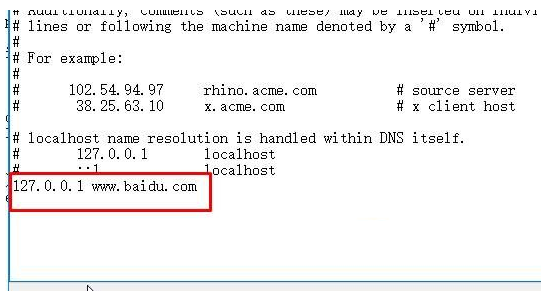
瀏覽器訪問該網域將解析至本機回環,達到封鎖效果。解封只需刪除對應行。
Win 10 開始選單如何置頂常用應用程式?資料夾捷徑加空格排序法
Windows 10 關閉最近使用的檔案(快速存取):同 ID 23299 註冊表修改法重複
Windows 10 七大優勢解析:Cortana、Windows Hello、觸控、Ink、硬體擴充、支援生態、遊戲天堂
Win10 徹底刪除檔案防復原:cipher /w:C 抹除可用空間,單檔用檔案粉碎器
Win10 關閉 Windows 錯誤報告完整教學:透過群組原則徹底停用
如何獲取或更新 Win10 系統升級圖標(KB3035583 修正)