Windows XP Windows 7 Windows 2003 Windows Vista Windows 綜合教學 Linux 系統教學
Windows 10 Windows 8 Windows 2008 Windows NT Windows Server 電腦軟體教學

Win 10 無法開啟軟體提示「伺服器未及時回應」?建立新管理員帳戶或 PowerShell 重註冊 App 修復

編輯:Windows 10 系統介紹

軟體無法開啟、提示伺服器未及時回應,兩種修復法:
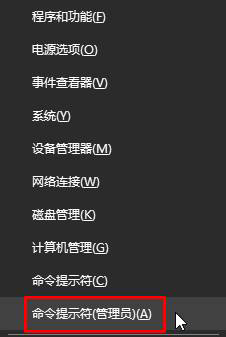
方法一:命令提示字元建立/啟用管理員帳戶

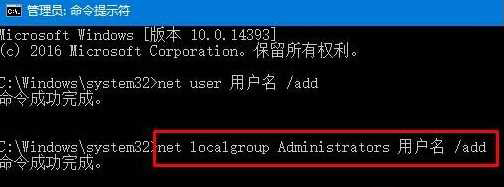
  1. Win+X → 「命令提示字元 (系統管理員)」。
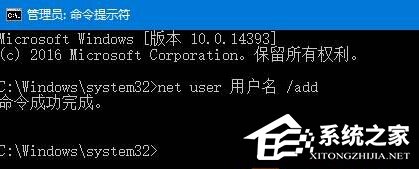
  2. 依序執行 (用戶名換成當前登入帳號):
net user 用戶名 /add
net localgroup Administrators 用戶名 /add
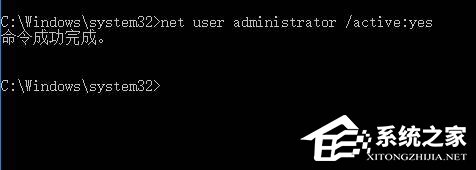
net user 用戶名 /active:yes
方法二:PowerShell 重註冊所有 UWP 應用

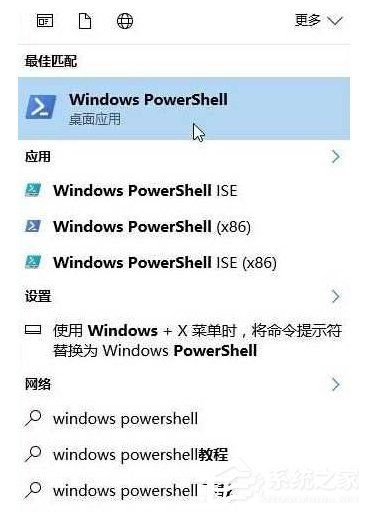
  1. 小娜搜尋「Windows PowerShell」→ 右鍵「以系統管理員身分執行」。
  2. 執行:Get-AppxPackage -AllUsers | Foreach {Add-AppxPackage -DisableDevelopmentMode -Register "$($_.InstallLocation)AppXManifest.xml"} 等待完成。

方法一修復帳戶權限異常,方法二修復 UWP 應用註冊損毀,視情況選擇或雙管齊下。

Copyright © Windows教程網 All Rights Reserved