需輸入 ①②③④ 等帶圓圈數字?搜狗輸入法內建 軟鍵盤「數字序號」 功能,無需 Word 特殊符號、無需記憶 Unicode 碼,三步完成輸入。
操作步驟
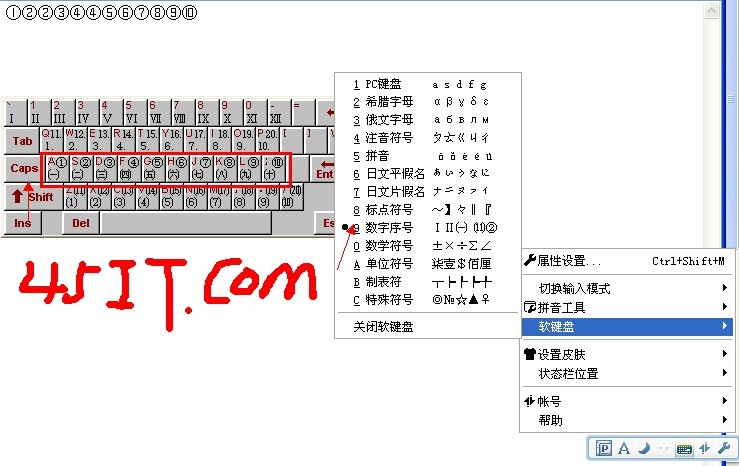
- 任意輸入框激活搜狗拼音 → 狀態欄右鍵 → 「軟鍵盤」 → 「數字序號」
- 彈出軟鍵盤面板 → 點擊 Caps Lock 鍵(切換到圓圈數字模式)
- 鼠標點擊或鍵盤輸入對應數字鍵 → 自動輸出 ①②③...⑳
適用場景
- QQ/微信簽名、昵稱裝飾
- 文檔列表編號、試卷選項標記
- 社交媒體排版美化
補充:其他輸入法同類功能
- QQ拼音:右鍵狀態欄 → 軟鍵盤 → 數字序號
- 微軟拼音:Win+句號 → 符號面板 → 數字序號分類
- 通用法:Word → 插入 → 符號 → 子集「帶圈字母數字」
搜狗軟鍵盤法最便捷,無需切換軟件,即時輸入即時可用。