現象
卸載 Workstation 5 過程中斷或殘留,導致安裝 Workstation 6 時出現 Error 1316: A network error occurred while attempting to read from the file C:\WINDOWS\Installer\VMware Workstation.msi,安裝進度倒退最終失敗。
根因
Windows Installer 快取資料庫殘留舊版安裝資訊,控制台「新增/移除程式」與優化大師均看不到,但安裝程式偵測到衝突。
解決方案:Windows Installer Cleanup Utility
- 下載 Windows Installer Cleanup Utility (msicuu2.exe):
官方下載連結
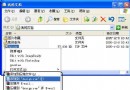
- 安裝並啟動(開始 → 所有程式 → Windows Install Clean Up)。
- 列表中會顯示所有曾安裝過的 MSI 產品(含控制台看不到的殘留項目)。找到 VMware Workstation 相關項目(可能有多筆)。
- 選中 → 「Remove」→ 確定移除。
- 重開機後即可正常安裝 Workstation 6 或新版本。
補充說明
- 此工具同樣適用於其他 MSI 封裝軟體的殘留清理(Office、Visual Studio、SQL Server 等)。
- 若清理後仍有問題,可配合方案二(VMware_Install_Cleaner.exe)深度清除註冊表與檔案。
- 微軟已停止更新此工具,新版 Windows(10/11)建議使用「設定 → 應用程式 → 選擇性功能」或第三方清理工具(如 Geek Uninstaller、Revo Uninstaller)。