VMware 安裝程式透過檢查註冊表鍵值判斷是否已安裝。標準卸載程式常遺漏部分鍵值、服務、驅動程式、資料夾,導致再次安裝時偵測到殘留而報錯(如 Error 1316、安裝倒退)。
VMware-workstation-<version>.exe /c操作前請備份註冊表(regedit → 檔案 → 匯出)!
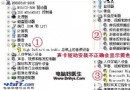
VMware Authentication ServiceVMware Registration ServiceVMware DHCP ServiceVMware NAT Servicehcmon, VMware Network Application Interface, VMparport, vmx86, VMware Bridge ProtocolVMware_Install_Cleaner.exe。C:\Program Files\VMware(安裝目錄,先備份虛擬機檔案)C:\Documents and Settings\All Users\Application Data\VMwareC:\Documents and Settings\All Users\Start Menu\Programs\VMware%SystemRoot%\system32\ 及 drivers\ 下):vmnat.exe, vmnetbridge.exe, vmnetdhcp.conf, VMNetDHCP.exe, vmnetdhcp.leases, vmnetnat.conf, vmxw2ksetup.dll, vnetprobe.exe, vnetprobelib.dll, vnetinst.dll, vnetlib.dll, vnetlib.exedrivers\vmnet.sys, vmnetx.sys, VMparport.sys, vmx86.sys, vmnetadapter.sys, vmnetbridge.sys, vmnetuserif.sys, hcmon.sys, vmusb.sys__vmware_user__ 使用者與 __vmware__ 群組。重開機後執行 regedit 搜尋「VMware」,若無殘留鍵值即為乾淨。若仍有問題,建議重灌系統最省時。