Windows XP Windows 7 Windows 2003 Windows Vista Windows 綜合教學 Linux 系統教學
Windows 10 Windows 8 Windows 2008 Windows NT Windows Server 電腦軟體教學
您现在的位置: Windows教程網 >> Windows教程 >  >> 電腦軟體教學 >> 網路工具

Chrome 無法安裝第三方擴充套件?兩大解決方案(拖曳安裝/修改啟動參數)

編輯:網路工具

背景

Chrome 21+ 版本限制僅能安裝 Chrome 應用商店內的擴充套件,外部 .crx/.js 檔案直接安裝被攔截。

方案一:拖曳安裝法(推薦,無需修改參數)

  1. 下載外部擴充套件 .crx 或 .js 檔案到本地。
  2. 開啟 Chrome 擴充套件頁:網址列輸入 chrome://extensions/。
  3. 開啟右上角「開發人員模式」開關。
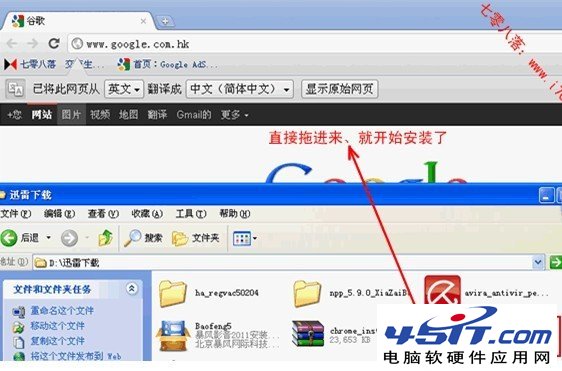
  4. 將 .crx/.js 檔案直接拖曳至該頁面,確認安裝。

拖曳安裝CRX至擴充套件頁

方案二:修改啟動參數法(舊版通用)

  1. 桌面 Chrome 快捷方式右鍵 →「內容」。
  2. 「目標」欄位末尾加入空格 + --enable-easy-off-store-extension-install。
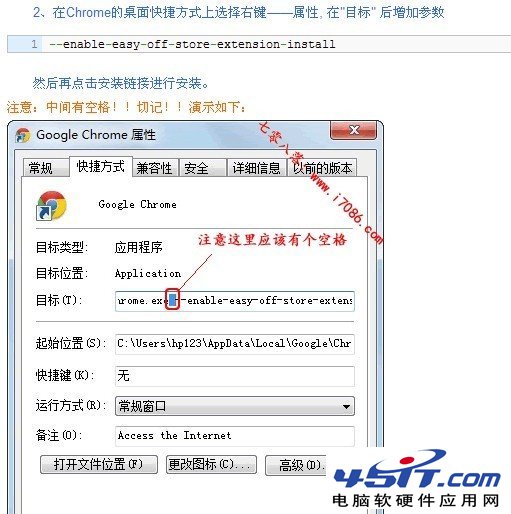
    範例:"C:\Program Files\Google\Chrome\Application\chrome.exe" --enable-easy-off-store-extension-install
  3. 確定 → 重啟 Chrome。

修改Chrome啟動參數

補充:安裝提示「Could not create directory for unzip」

環境變數 TEMP/TMP 指向不可寫入路徑。解決:
「我的電腦」右鍵 → 內容 → 進階系統設定 → 環境變數 → 編輯 TEMP 和 TMP 為 C:\Windows\Temp → 確定重啟瀏覽器。

避坑建議

  • 優先使用 Chrome 應用商店官方擴充套件,安全性有保障。
  • 第三方擴充套件僅從可信來源(GitHub 官方倉庫、開發者官網)下載。
  • 定期審核已安裝擴充套件權限,移除不再使用者。
Copyright © Windows教程網 All Rights Reserved