需快速重置 Outlook 設定時,可使用命令列參數匯入 .prf 設定檔:
.prf
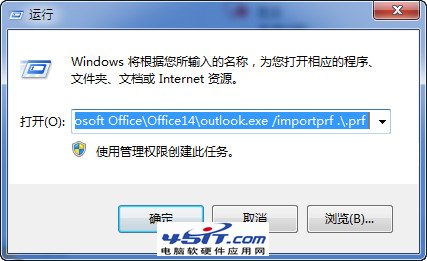
WIN+R 開啟「執行」
輸入: "C:\Program Files (x86)\Microsoft Office\Office14\outlook.exe" /importprf .\.prf
注意:
此法適用於企業批次部署或個人快速還原預設設定。
GreenBrowser 圖片管理與瀏覽效率技巧:一鍵存圖、分頁管理、自動分類全解析
Web 迅雷節電技巧:下載完成自動關機 + 批量任務通配符設定
WinGate 代理伺服器進階設定與應用技巧(二)
Outlook 已寄送郵件找不到記錄?勾選「在已寄送郵件資料夾保留副本」即解
BitComet 參數深度優化指南:從全域設定到動態調速,榨乾頻寬極速下載
QQ 瀏覽器圖標點亮教學:安裝電腦版→設為預設→登入 QQ 三步驟
飛信群建立完整圖文教學:從建群到管理權限設定
IE9「使用軟體繪圖而非 GPU」選項消失?註冊表修復教學