Windows XP Windows 7 Windows 2003 Windows Vista Windows 綜合教學 Linux 系統教學
Windows 10 Windows 8 Windows 2008 Windows NT Windows Server 電腦軟體教學
您现在的位置: Windows教程網 >> Windows教程 >  >> 電腦軟體教學 >> 網路工具

Chrome 瀏覽器百度網盤無法上傳?停用 PPAPI Flash 解決衝突

編輯:網路工具

問題現象

Chrome 瀏覽器訪問百度網盤 (盤) 網頁版,點擊上傳無反應、上傳元件不顯示、或顯示「需安裝 Flash」。

原因

Chrome 內建兩組 Flash Player:PPAPI (Chrome 專用) 與 NPAPI (傳統)。百度網盤舊版上傳元件僅相容 NPAPI,雙版本共存導致衝突。

解決步驟

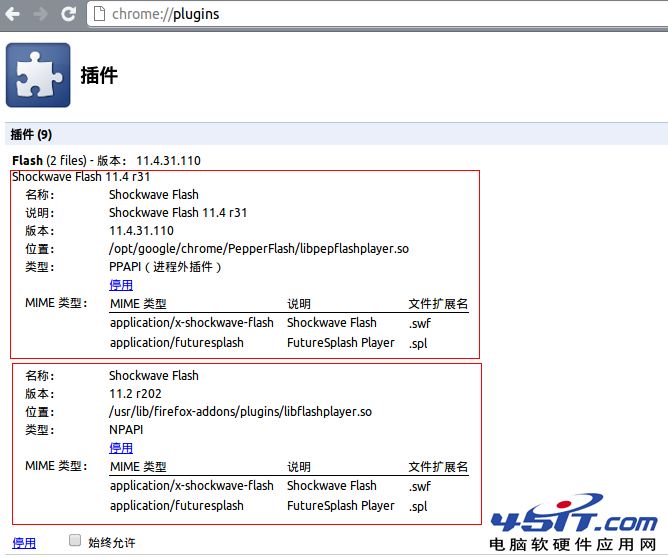
  1. 網址列輸入 chrome://plugins/ 開啟外掛管理頁 (舊版 Chrome);
    新版 Chrome (57+) 已移除此頁,請至 chrome://settings/content/flash 或直接在網址列點擊鎖圖示 → 站台設定 → Flash → 允許/封鎖。
  2. 找到 Adobe Flash Player 兩組項目:
    - Type: PPAPI (路徑含 PepperFlash)
    - Type: NPAPI (路徑含 NPSWF32)
  3. 停用 PPAPI 版本 (點擊「停用」或切換為「封鎖」),保留 NPAPI 版本啟用。

    Chrome plugins 頁面

  4. 重新整理百度網盤頁面,上傳功能恢復正常。

補充說明

  • Chrome 76+ 已預設封鎖 Flash,2020 年底完全移除 Flash 支援。百度網盤網頁版已全面遷移至 HTML5 上傳元件,無需 Flash。
  • 若仍遇問題,請更新 Chrome 至最新版、清除瀏覽器快取、或改用百度網盤官方客戶端上傳 (支援斷點續傳、多執行緒、不限檔案大小)。
Copyright © Windows教程網 All Rights Reserved