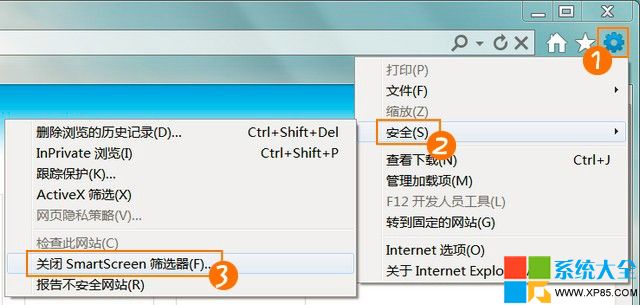
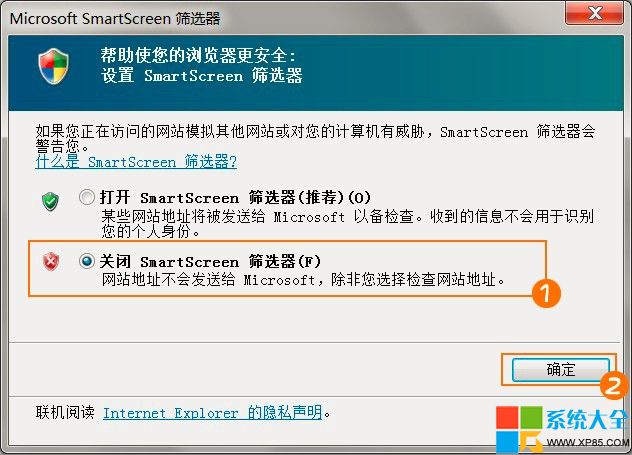
SmartScreen 篩選器即時檢查網站信譽與下載檔案安全,但會拖慢開網頁速度、且誤報可信軟體「非常見下載內容」。關閉可提升體驗。
風險提示:關閉後失去即時釣魚網站、惡意下載攔截保護,建議搭配防毒軟體、瀏覽器擴充廣告攔截器使用,或僅在下載大型可信軟體時暫時關閉,事後重新啟用。
微信 6.1 點贊統計查看教程:一鍵查收過去一年給出/收到的贊數
Windows 命令提示字元進階玩法:快速進入資料夾、管理員模式啟動、失效急救全攻略
CF 9 月最炫幸運星第一期:武器道具低至 3 折,1 折幸運星驚喜開啟
自建釣魚 WiFi 熱點竊取手機號:Kali/BT5 + SET + DHCP + Apache 完整實施流程
IE 9 官方中文版下載與十大亮點深度解析:界面革新、網頁固定與效能飛躍
美圖秀秀 Windows 8 版正式發布:微軟首推體驗應用、功能精簡直觀
逍遙安卓模擬器「運行環境異常修復中」循環解決方案
LOL 測試服 V5.16 版本搶先爆料:新頭像、鋼鐵軍團蓋倫特效優化、界面顯示敵方可見性