安裝 Hyper-V 角色並重啟後,系統藍屏停機,錯誤碼多為 0x0000005D / 0x00000101,提示 HYPERVISOR_ERROR。
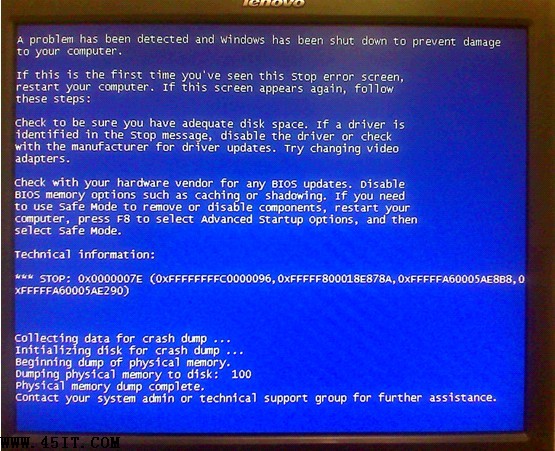
BIOS 中啟用了 Intel TXT (Trusted Execution Technology) / TXT (Trusted Execution Technology)。Hyper-V 早期版本與 TXT 存在兼容性衝突,導致虛擬化管理程序啟動階段檢查失敗觸發機檢異常 (MCE)。
Advanced → CPU Setup → Intel TXT / TXT SupportSecurity → Intel TXTAdvanced → Processor Configuration → Trusted Execution Technology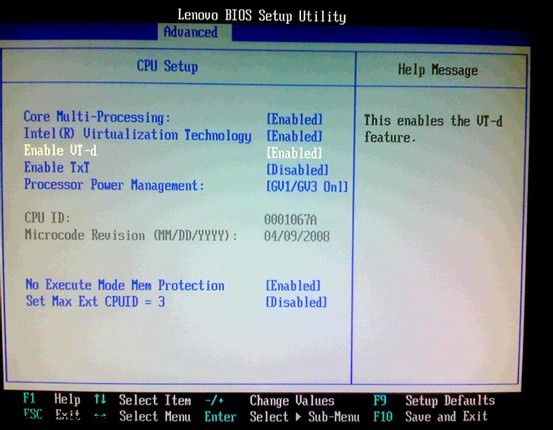
| 技術 | 全稱 | 作用 | Hyper-V 關係 |
|---|---|---|---|
| VT-x | Virtualization Technology | CPU 虛擬化核心指令集 | 必須開啟 |
| VT-d | Virtualization Technology for Directed I/O | I/O 設備直通 (SR-IOV、GPU 直通) | 建議開啟,增強安全/性能 |
| TXT | Trusted Execution Technology | 啟動鏈可信度量、動態信任根 | 早期版本衝突需關閉;Win2012 R2+ 已修復兼容 |
Windows Server 2008 已停止主流支持(2015)與延伸支持(2020)。生產環境強烈建議遷移至 **Windows Server 2019/2022**,原生修復 TXT 兼容性、引入屏蔽 VM、VBS/HVCI 安全特性、存儲/網絡性能大幅提升。