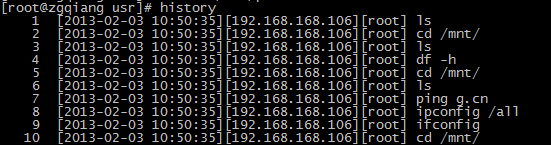
預設 history 僅顯示指令編號與內容,缺乏時間、用戶資訊,難以追蹤操作审計軌跡。本文說明如何透過 /etc/profile.d/ 腳本設定 HISTTIMEFORMAT,實現含用戶名、完整時間戳的歷史紀錄,並啟用 histappend 避免多終端機覆寫。
sudo vim /etc/profile.d/history_command.sh
#!/bin/bash
export HISTFILE=$HOME/.bash_history
export HISTSIZE=1200
export HISTFILESIZE=1200
export HISTCONTROL=ignoredups      # 忽略連續重複指令
export HISTTIMEFORMAT="`whoami` %F %T "  # 關鍵:用戶名 + 日期時間
shopt -s histappend                # 追加模式,不覆寫
typeset -r HISTTIMEFORMAT          # 唯讀防篡改
source /etc/profile.d/history_command.sh
history 5
# 輸出範例:
# 1008 root 2024-05-20 14:30:15 vim /etc/profile
# 1009 root 2024-05-20 14:31:02 history | less
# 1010 root 2024-05-20 14:32:10 cat /etc/profile.d/history_command.sh
HISTTIMEFORMAT:支援 strftime 格式,%F=YYYY-MM-DD,%T=HH:MM:SS。HISTCONTROL=ignoredups:避免連續重複指令汙染歷史。shopt -s histappend:多終端機同時操作時各自追加,不互相覆蓋。設定完成後,所有互動式登入 Shell 皆自動套用,審計追蹤能力大幅提升。