uGet 2 是 Linux 下功能最完整的下載管理器:多執行緒加速、斷點續傳、鏡像站支援、BitTorrent/Metalink 解析、Aria2 RPC 批次控制、Firefox/Chrome 擴充套件一鍵接管下載。
sudo add-apt-repository ppa:plushuang-tw/uget-stable
sudo apt-get update
sudo apt-get install ugetsudo add-apt-repository ppa:t-tujikawa/ppa
sudo apt-get update
sudo apt-get install aria2安裝後在 uGet 設定 → 外掛程式 → 啟用 aria2 外掛,即可使用 RPC 介面控制 Aria2 後端。
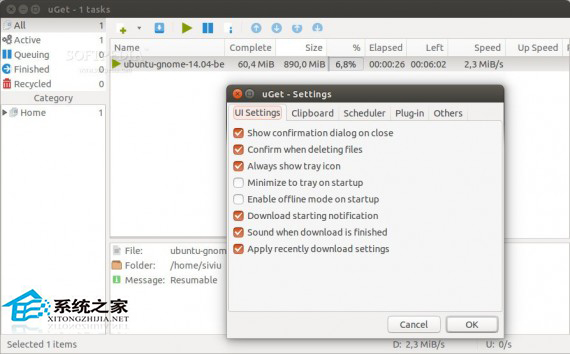
核心功能: 全域速度限制/排程、分類管理、匯入/匯出下載清單、系統匣最小化、命令列介面 uget-gtk 適合腳本自動化、支援 30+ 語言介面。
Linux 安裝配置 Vim IDE 完整指南:Vundle 外掛管理、基礎設定 (配色/縮排/自動儲存/括號匹配/摺疊/系統剪貼簿)、常用外掛推薦
CentOS 透過 yum 安裝 jwhois 套件以支援 whois 域名查詢指令
Linux 駭客進階技巧 8 選:程序偵測、批次取代、終端修復、瀏覽器關鍵字、多重 X 會話、預載瀏覽器、rsync 備份、NTP 校時
Linux 使用 chattr +i 建立不可變更檔案,防止誤刪與竄改
CentOS 安裝 kernel-headers 完整教學:版本對齊與手動安裝