Windows XP Windows 7 Windows 2003 Windows Vista Windows 綜合教學 Linux 系統教學
Windows 10 Windows 8 Windows 2008 Windows NT Windows Server 電腦軟體教學

用 IsoBuster 整合 SP1 製作可開機 Windows XP 安裝光碟

編輯:XP 系統基礎知識

每次裝完 XP 再裝 SP1 很麻煩?用 IsoBuster 提取原版光碟開機映像,配合命令列整合 SP1,即可燒錄一張整合 SP1 且可開機的安裝光碟。

工具與準備

  • IsoBuster(下載:官網)
  • 硬碟建立 WinXP 資料夾(>1GB 空間),複製原版光碟所有檔案至此。
  • 建立 SP1 資料夾,解壓縮 SP1 更新包至此。

整合 SP1

進入「MS-DOS 模式」(命令提示字元),執行:
G:\SP1\update\update.exe -s:G:\WinXP
(路徑依實際調整)。整合完成後 WinXP 目錄即為含 SP1 的安裝來源。
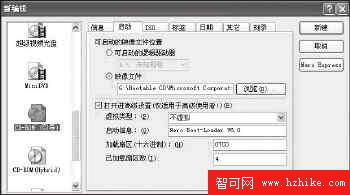

圖 1:整合 SP1 過程

燒錄可開機光碟

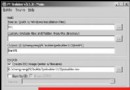
  1. 用 IsoBuster 開啟原版光碟,提取 Bootable CD\Microsoft Corporation.img(開機映像關鍵檔)。
  2. Nero Burning ROM 6.0 選「CD-ROM (開機)」,映像檔選上述 .img,虛擬類型「不虛擬」,已載入磁區數設 4。
  3. 將 WinXP 目錄所有檔案拖入燒錄,完成!
Copyright © Windows教程網 All Rights Reserved