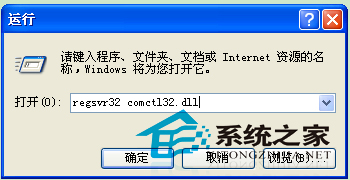
開機彈出「找不到 comctl32.dll」錯誤,表示系統通用控制庫遺失或損毀。解法:取得同版本檔案放入 C:\Windows\System32,再用 regsvr32 註冊。
C:\Windows\System32
regsvr32
comctl32.dll
regsvr32 comctl32.dll
若系統檔案大量遺失,建議執行 sfc /scannow 系統檔案檢查器全盤掃描修復。
sfc /scannow
Windows XP 內建定時關機功能完整教學:指令參數與實操範例
WinXP控制台無法開啟:兩條命令重新註冊DLL/OCX修復
WinXP 找不到區域連線怎麼建立?手動新增區域連線教學
Windows 開機自動登入設定:註冊表法 vs 使用者帳戶控制面板
低階格式化拯救硬碟?詳解原理、風險與實操全攻略
永中 Office「郵件合併」實戰:批量產製家長通知單、薪資條、信封,告別逐份手工編輯
WinXP 筆電開啟內建攝影機:我的電腦雙擊 USB 影像裝置或用 QQ 自動偵測
Windows XP 局域網共享出現「無任何網路提供者接受指定的網路路徑」完整排除指南