Windows XP Windows 7 Windows 2003 Windows Vista Windows 綜合教學 Linux 系統教學
Windows 10 Windows 8 Windows 2008 Windows NT Windows Server 電腦軟體教學

WinXP 語言列變灰無法輸入中文?三大解法:關閉進階文字服務、登錄檔預載入、補回系統檔

編輯:XP 系統應用技巧

語言列與「內容」按鈕變灰、無法切換中文輸入,常見三大成因與解法:
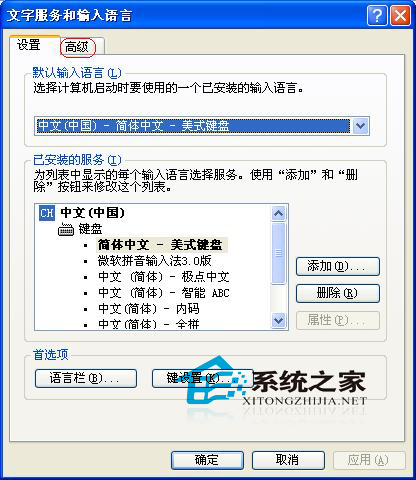
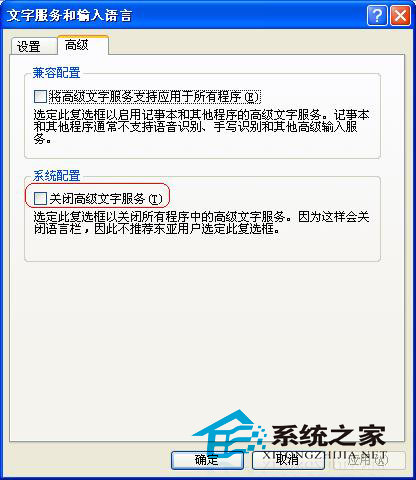
  1. 進階文字服務被關閉:「控制台」→「地區和語言選項」→「語言」→「詳細資料」→「進階」→ 取消勾選「關閉進階文字服務」。
  2. 登錄檔預載入缺失: regedit → HKEY_CURRENT_USER\Keyboard Layout\Preload → 新增字串值 1 = 00000409 (美式鍵盤) → 重開機。
  3. 系統檔遺失: 從他機複製 internat.exe、ctfmon.exe 至 C:\Windows\System32,登錄檔 HKEY_LOCAL_MACHINE\Software\Microsoft\Windows\CurrentVersion\Run 新增 internat.exe 字串值 → 重開機。

依情況擇一嘗試,通常方法一即可解決多數情況。

Copyright © Windows教程網 All Rights Reserved