XP/Server 2003 中,資源管理員以縮圖/幻燈模式瀏覽 BMP/JPEG/GIF/PDF/HTM 等檔案時,預設自動產生縮圖快取,即資料夾下反覆出現的 Thumbs.db。
進入 Vista 時代,資料夾下找不到 Thumbs.db,並非不再產生,而是微軟改變儲存方式——集中儲存。路徑位於:
k:\Users\Administrator\AppData\Local\Microsoft\Windows\Explorer\(k: 為 Vista 安裝磁碟代號)
此處可見大量 thumbcache_sr.db 等檔案,個頭驚人(如圖所示達 159MB),佔用大量磁碟空間,建議定期清理。刪除需取得相應權限,嫌麻煩可重開機進入其他系統定期清理。
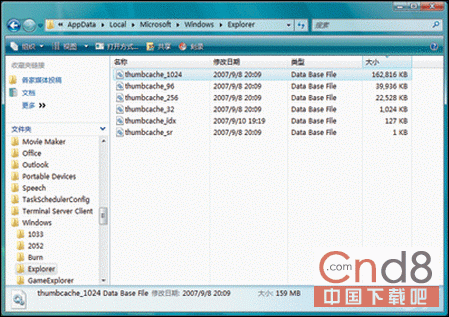
thumbcache_sr.db 檔案
提示: 若希望在 XP 下取消縮圖快取功能,開啟「資料夾選項」→「檢視」,勾選「不快取縮圖」核取方塊即可。