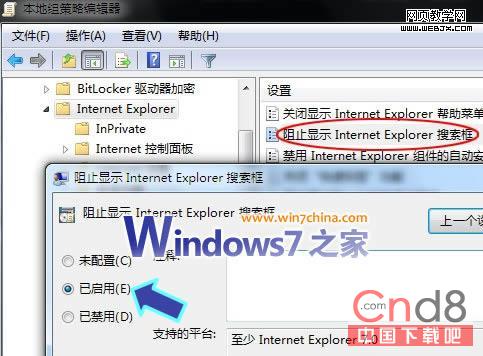
Windows 7 / Vista / Server 2008(需專業版以上支援 gpedit.msc)。
gpedit.msc
同路徑將該項目設為「未設定」或「已停用」即可恢復搜尋框。
家用版無 gpedit.msc 者,請參考「方法一:IE 管理大師/優化大師一鍵隱藏」(見前文)。
XP 不斷彈出「信使服務」視窗干擾工作?永久關閉 Messenger 服務步驟詳解
XP SP2 安全中心誤報「防毒未啟用」:三種消除紅盾圖示方法
Internet Explorer 版本回顧 (3):IE 7/8 面對 Firefox/Chrome 夾擊的求變之路
Windows XP 顯示卡驅動程式安裝提示硬體不相容解決方案
IE 瀏覽器常見故障自我修復指南:惡意插件、腳本病毒、首頁劫持
Word 快速插入螢幕擷圖:金山影霸「存入剪貼板」+ Ctrl+V 秒貼上,免存檔免匯入
Windows XP 桌面環境完整設定指南:主題切換、自訂建立、刪除管理
Windows XP 撥號上網:離線後仍能查看累計上網時間(事件檢視器法)