「快速啟動」列上的「顯示桌面」圖示並非一般捷徑,若不小心刪除,無法透過一般方式(如從桌面拖曳)恢復。以下提供標準修復步驟:
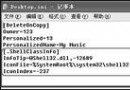
[Shell]
Command=2
IconFile=explorer.exe,3

[Taskbar]
Command=ToggleDesktopShow Desktop.scf(含副檔名,大小寫不拘)。將該檔案複製到以下路徑(請將 用戶名 替換為實際登入帳號):
C:\Documents and Settings\用戶名\Application Data\Microsoft\Internet Explorer\Quick Launch完成後,「顯示桌面」圖示即會出現在快速啟動列,點擊即可切換桌面顯示狀態。
Windows XP 開機加速實測:Prefetch 參數調教誤區與正確優化之道
Windows XP 修復與重新安裝 Internet Explorer 6 完整方案
WinXP關閉Windows防火牆兩種方法:控制台與網路芳鄰快速切換
常見軟體後遺症修復實戰 (3):影子系統與虛擬光碟衝突藍屏、同類軟體衝突通解
Windows XP 退市我見:我們為何仍堅守不捨?九大理由逐一回應
Excel 保護工作表:解鎖輸入區 + 鎖定公式區 + 設定密碼,實現「可輸入、可瀏覽、不可改結構」精細權限
DameWare Mini Remote Control 無法連線 Windows XP SP2?完整五步驟設定防火牆與群組原則放行