Windows Server 2008 預設為追求安全與穩定,對網路連線施加諸多限制,導致瀏覽網頁速度不如預期。透過調整登錄與網路協定設定,能顯著改善上網體驗。
預設 IE 僅允許同時從同一站點下載兩個物件。修改登錄可提高並行連線數:
regedit 開啟登錄編輯器。HKEY_CURRENT_USER\Software\Microsoft\Windows\CurrentVersion\Internet Settings。MaxConnectionsPer1_0Server 與 MaxConnectionsPerServer,皆設為 10(十進位)。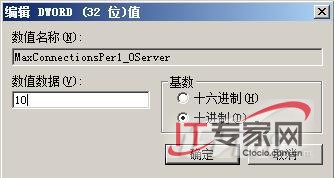
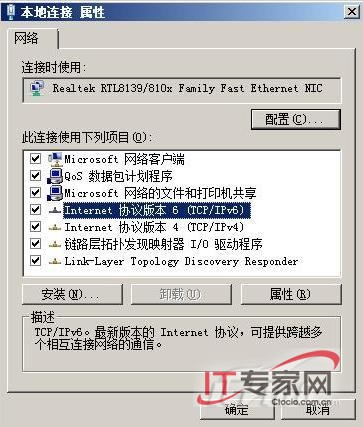
預設安裝的 IPv6、Link-Layer Topology Discovery 等協定在現有環境中鮮少用到,反而增加系統負擔。建議於「網路連線」→「區域連線」屬性中,僅保留「Internet 通訊協定第 4 版 (TCP/IPv4)」與「Microsoft 網路的檔案和印表機共享」(若需區域網路共享),取消其餘協定勾選。
完成上述設定後,網頁開啟速度與網路連線穩定度將明顯提升。
Windows Server 2008 NAP (網路存取保護) 完整部署指南:從 NPAS 角色安裝到健康原則設定
Windows Server 2008 AD LDS 輕型目錄服務深度解析
Windows Server 2008 遠端桌面允許同一帳號多用戶同時登入配置
Windows Server 2008 R2 修改 SID 完整教學:Sysprep 實戰與避坑指南
Windows Server 2003 與 2008 區別、聯繫與選型指南
靈活運用 Windows Server 2008 指令破解系統管理難題
Windows Server 2008 版本差異完整解析:Standard、Enterprise、Datacenter、Web 與 Itanium 版比較