誤刪桌面回收站圖示,右鍵桌面空白處無「屬性」選項,無法透過傳統方式恢復。
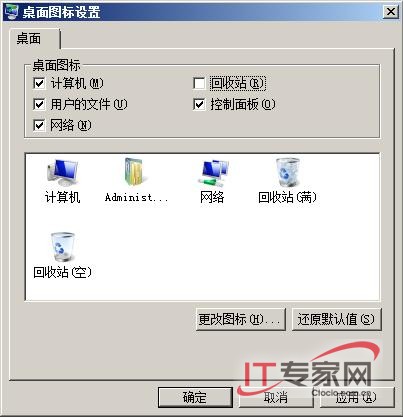
同一視窗可勾選/取消「電腦」、「網路」、「控制台」、「使用者的檔案」等系統圖示,快速自訂桌面佈局。
Windows Server 2008 R2 中 IIS 7.5 的關鍵改進
Windows Server 2008 安裝 RAID/SAS 硬碟驅動程式完整圖文教程
Windows Server 2008 R2 Active Directory 資料庫維護:NTDS.dit 壓縮整理與移動至專用磁碟 (ntdsutil 實戰)
微軟公布 Windows 7 與 Windows Server 2008 R2 同步上市時程表
Windows Server 2008 IE 設定 Proxy 伺服器完整步驟:區域網路設定、進階例外、驗證
Windows Server 2008 R2 新功能全覽:64 位元專屬、256 邏輯處理器、Hyper-V 即時遷移