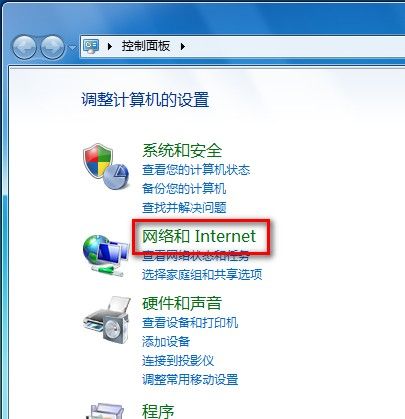
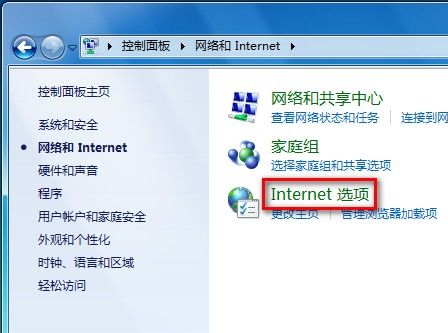
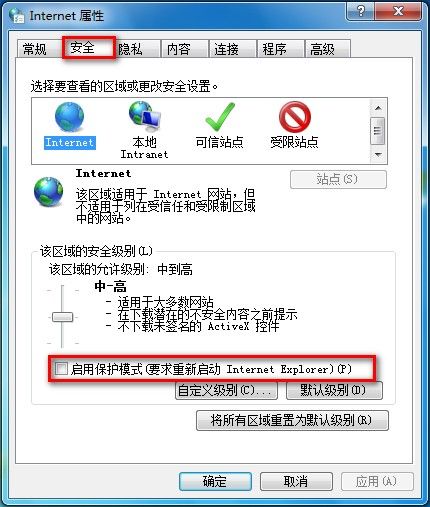
Win7 IE 保護模式開關:
將 NTFS 加密/解密加入右鍵選單:一鍵操作告別繁瑣屬性頁
Win7 設定 IE 自動配置指令碼:工具→網際網路選項→連線→區域網路設定→勾選使用自動配置指令碼→輸入指令碼位址
網管必會 Net 命令 20 大實戰技巧:查看/管理網路、使用者、服務、共享、列印、時間同步全搞定
最安全開啟 USB 隨身碟的方法:命令列模式避開病毒自動執行
電腦系統與軟體全方位優化大全:從啟動加速到硬體監控的完整指南
Windows 7 更換桌面主題:內建主題、線上下載、自訂主題建立、主題封裝分享
Win7 還原 IE8 預設值:工具→網際網路選項→進階→重置→再次重置→重啟 IE,可選同時刪除暫存檔/歷史記錄/Cookie/表單資料/密碼/InPrivate 篩選資料