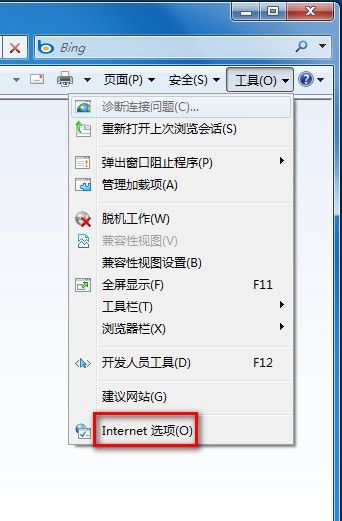
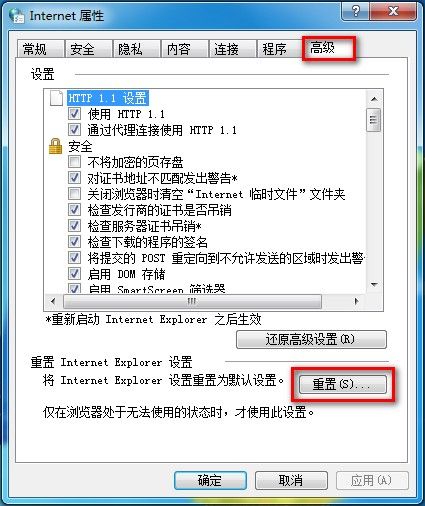
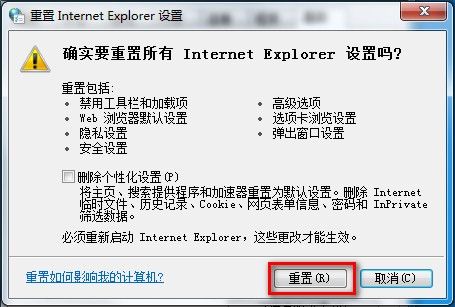
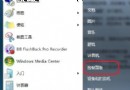
Win7 還原 IE8 預設值步驟:
預設不刪除暫存檔、歷史記錄、Cookie、表單資料、密碼、InPrivate 篩選資料;需刪除者,重置前勾選對應項目。
高手進階:深度解析 BOOT.INI 結構與多重啟動修改實戰
寫字板啟動時自動載入「字元對應表」——批次檔一鍵實現
輸入法圖示消失?複製 ctfmon.exe 並加入啟動項即可找回
提升 Guest 帳號遠端桌面連線效率:三步驟賦予管理員權限與連線權利
Win7 管理/停用 IE8 增益集:三種方式開啟管理介面,可依類型篩選、停用/啟用/刪除/設為預設,部分增益集僅能停用不可刪除
Windows IPv6 安全性深度思考:IPSec 崩潰、IKE 缺失、手動金鑰管理災難
Win Rescue 95/98:給系統崩潰留後路,備份還原一條龍
巧解 Windows 登入後自動登出:userinit.exe 遺失與註冊表錯誤完整修復指南