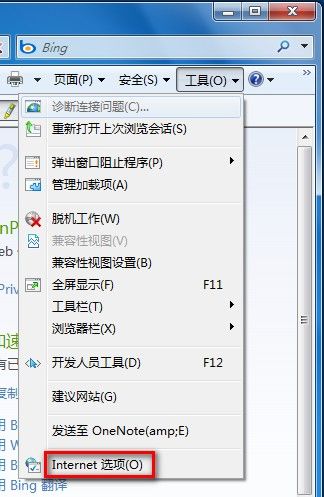
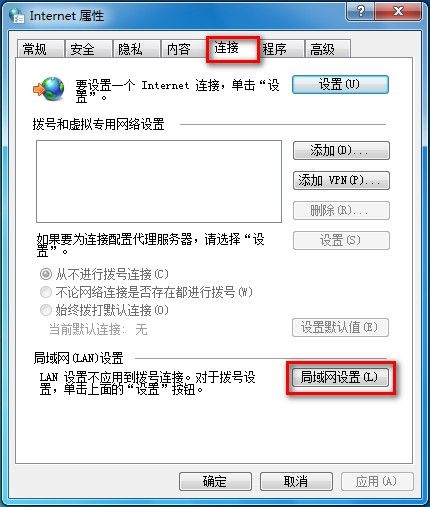
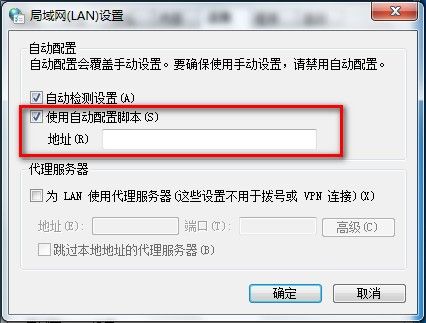
Win7 IE 自動配置指令碼設定:
入門教學:Windows 2000/XP VPN 用戶端設定步驟詳解
深度剖析 7b.com.cn 瀏覽器劫持病毒:從混淆腳本到惡意下載器完整還原
Msvdm.dll 一鍵將單一桌面擴充為四個虛擬桌面
Windows 軟體安裝與移除入門:五大安裝模式、四步驟流程、組件管理全攻略
打造 Linux + Windows 多重引導:用 NT Loader 統管 Win98/2K/Linux 雙/多系統
Windows 安裝免輸入序號技巧總整理(Win98~Longhorn 通用)
Windows 鍵高手必學:五大黃金組合鍵大幅提升操作效率
Windows 7 快速判斷系統是否已啟用正版授權