工作列點擊無反應、開始選單打不開、搜尋失效,常因 UWP 系統應用註冊損壞(如更新中斷、第三方優化工具誤刪)。管理員 PowerShell 執行單行指令重註冊所有使用者的 AppX 套件,多數情況可修復。
Get-AppXPackage -AllUsers | Foreach {Add-AppxPackage -DisableDevelopmentMode -Register "$($_.InstallLocation)\AppXManifest.xml"}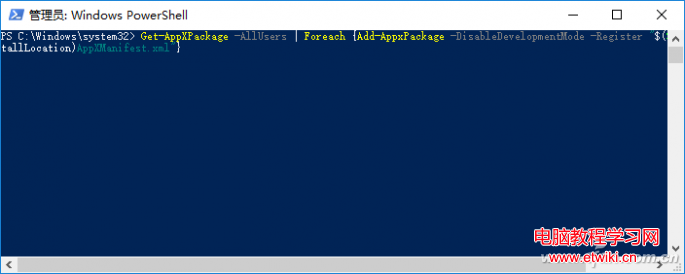
⚠️ 注意:指令會重註冊所有使用者的 UWP 應用(含商店、計算機、照片等),個別應用設定可能重置。若僅開始選單/搜尋異常,亦可嘗試僅重註冊Microsoft.Windows.StartMenuExperienceHost與Microsoft.Windows.Search兩個套件。
收不到 Win10 RS2 14901 更新怎麼辦?退出重新加入 Insider 計劃嘗試修復
Win10 創作者更新:如何找回經典「畫圖」取代 Paint 3D?兩大註冊表修復法
Win7/Win8 如何獲取 Authenticated Users 權限?完整圖文教學
Win8 系統 QQ 螢幕截圖快捷鍵失效?重置熱鍵設定一鍵恢復
安裝 Win10 系統盤空間不足升級失敗?360「系統盤瘦身」一鍵清理大文件騰出空間
Win10 磁碟分區合併教學:刪除卷 + 延伸卷,把 E、F 槽合併成大空間
Win10 修改 hosts 檔案無法儲存?取得完整權限 (Take Ownership + Full Control) 徹底解決