8 月 12 日推送 Win10 RS2 Build 14901 後,多用戶反映無法檢測更新。外媒建議方案:退出 Windows Insider 計劃 → 重新加入 → 再次檢查更新。
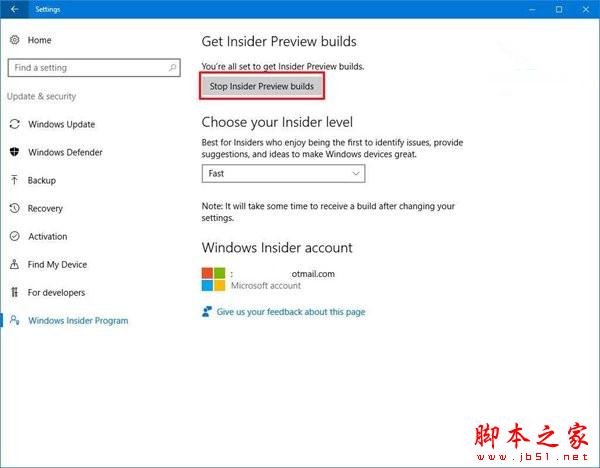
詳細 11 步驟
- 設定 → 更新與安全性 → Windows 開發者預覽計劃。
- 點擊「停止接收 Insider Preview 版本」。
- 選擇「我要完全停止接收 Insider Preview 版本」→ 確認。
- 點擊「重新啟動」。
- 重啟後進入設定 → 更新與安全性 → Windows Update。
- 點擊「進階選項」。
- 點擊「取得 Insider Preview 版本」中的「開始」。
- 彈出視窗確認 → 選擇「立即重新啟動」。
- 重啟完成 → 設定 → 檢查更新,可能即可下載 14901。
⚠️ 注意:此法編譯自外媒,**不保證 100% 有效**,微軟已知悉部分用戶無法更新問題,正在處理中。耐心等待官方修復亦是選項。