Win10 常見狀況:雙擊文字檔無反應、或彈出「選擇應用程式」卻找不到記事本。主因是 .txt 檔案關聯遺失或指向錯誤程式,手動指定 notepad.exe 即可修復。
.txt 檔 → 「開啟方式」 → 「選擇其他應用程式」。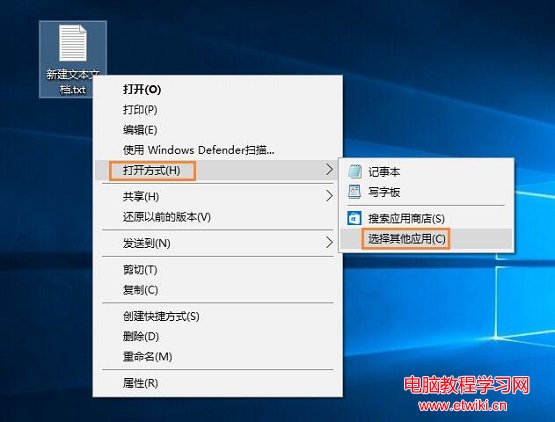
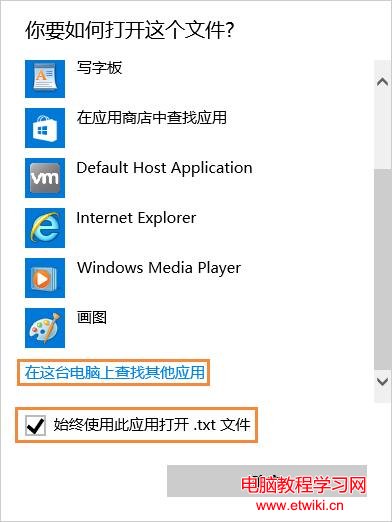
notepad.exe:
C:\Windows\SysWOW64\notepad.exe(32 位元相容版)或 C:\Windows\System32\notepad.exeC:\Windows\System32\notepad.exe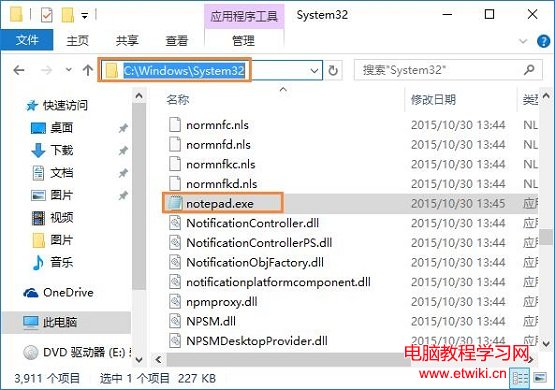
💡 補充:若上述無效,可嘗試以管理員身分執行 PowerShell 執行:assoc .txt=txtfileftype txtfile=%SystemRoot%\System32\notepad.exe %1
強制重建登錄關聯。
Win7 查看局域網 ARP 網路狀態指令教程:ipconfig/arp -a/arp -d 核心指令詳解
Win 7/8.1 預約升級 Win 10 失敗?解決方案:複製 $Windows.~BT 資料夾手動安裝
Win7 卸載軟體提示權限不足?以管理員身分執行卸載程式解決
Windows 8 通訊偵測自動降低其他音量:聲音設定圖解教學
老電腦升級Win7/Win8:硬體升級實戰指南,低成本換新生
Win10 更新後瀏覽器亂碼?chrome://flags 停用 DirectWrite 字體渲染,或刪除 ChromeDWriteFontCache 快取重建兩法修復