Windows 8 移除傳統開始選單,關機操作隱藏於 Charms 列 → 設定 → 電源,極不直覺。本文教學建立桌面捷徑一鍵執行關機、重啟、鎖定、休眠、睡眠,並釘選到開始畫面/工作列,附完整 shutdown.exe / rundll32.exe 參數表。
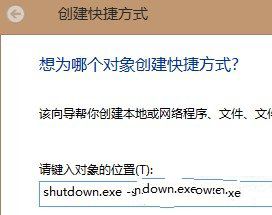



| 功能 | 命令 | 參數說明 |
|---|---|---|
| 關機 | shutdown.exe -s -t 0 | -s 關機、-t 0 等待 0 秒立即執行 |
| 定時關機 (30 秒) | shutdown.exe -s -t 30 | -t 秒數 |
| 重新啟動 | shutdown.exe -r -t 0 | -r 重啟 |
| 鎖定工作站 | rundll32.exe user32.dll,LockWorkStation | 亦可用 Win+L |
| 休眠 | rundll32.exe powrprof.dll,SetSuspendState | 寫入 hiberfil.sys 完全斷電 |
| 睡眠 (待命) | rundll32.exe powrprof.dll,SetSuspendState 0,1,0 | 參數 0,1,0 表待命模式 |
| 取消關機/重啟 | shutdown.exe -a | -a 中止已排程關機 |
| 強制關閉應用程式關機 | shutdown.exe -s -f -t 0 | -f 強制關閉應用程式不提示 |
shutdown.exe -s -t 60 -c "系統將在 1 分鐘後關機進行維護"。%SystemRoot%\System32\shell32.dll、imageres.dll 擷取豐富系統圖示。Win8.1 Update 1 起在開始畫面右上角直接提供電源按鈕;Win10 開始選單內建電源選單。但捷徑方式仍適用於所有版本,且可自訂圖示、參數、釘選位置,彈性更高。
Win10 使用蘋果 Flurry (流光) 螢幕保護程式:下載 .scr → 複製到 C:\Windows\System32 → 設定 → 個人化 → 螢幕保護程式選 Flurry
Win10 Mobile 10536 预览版越用越卡?微软确认性能回归正在修复,新版本评估中
Win10 字體模糊不清晰怎麼調整?自訂縮放等級設為 100% 解決
Win10 預覽版 14257 簡體中文專業版 64 位 ISO 鏡像下載(百度網盤)
Windows 7 任務管理器選單列消失?雙擊空白處一秒恢復
Win8.1 專業版禁用家庭群組服務:徹底阻止桌面圖示重複產生